Googlebook: The laptop Australian Android phone owners have been waiting for
Googlebook – a new category of laptops designed for the way we work today – will soon be available, and Australians are among the first in the world to get it. Built on the Android technology stack and paired with desktop foundations from ChromeOS, Googlebook is designed for Gemini Intelligence and engineered to work with your Android phone right out of the box.
Today, we often switch between starting tasks on our phones and finishing them on our laptops. To make that experience better for Android users, we teamed up with the best laptop makers in the industry to deliver top-tier hardware alongside Google's software experience that connects effortlessly with your phone [1].
Premium hardware from leading partners
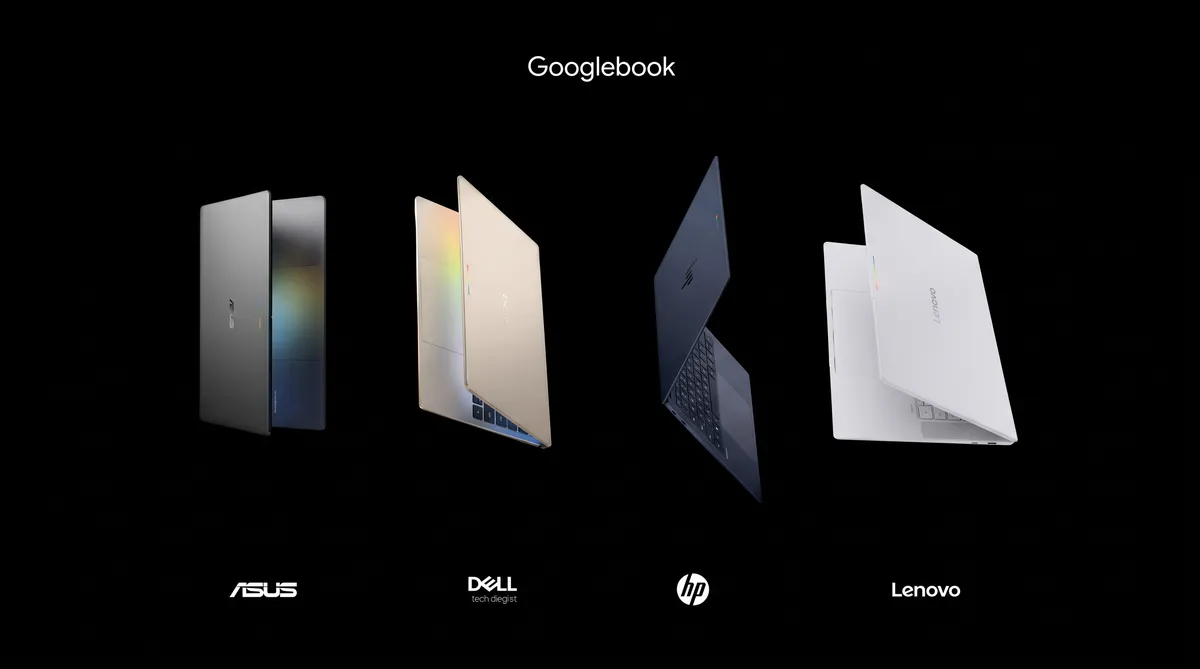
Our initial selection of flagship devices are built by ASUS, Dell, HP, and Lenovo, offering you choices that fit your style.
Starting at $2,299 RRP, every Googlebook features premium materials like aluminium, magnesium alloy, and carbon fibre in ultra-slim metal designs engineered for effortless portability. You’ll find responsive touchscreens with up to 2.8K OLED displays, haptic glass trackpads, and backlit keyboards. Under the hood, top-of-the-line processors from Intel and Qualcomm — paired with dedicated NPUs capable of over 45 TOPS — deliver snappy on-device performance.
We’re also bringing back a familiar favourite: the Glowbar. Positioned cleanly on the exterior, it lights up at startup, sweeps to show your battery charge level, and reacts with playful animations when you talk to Gemini.
The companion your phone has been waiting for
If you use an Android phone, your laptop shouldn't treat it like a stranger. Googlebook is built on a shared Android foundation, so your work moves naturally from one device to the other [2].
It starts with setting up your device. When you sign in, your Android phone’s settings, saved passwords, Wi-Fi networks, and messages will move with you, backed by end-to-end encryption. Once you’re set up, Googlebook makes it easy to move between your phone and laptop and back to get things done.
- Continue On: From pocket to desktop, effortlessly. Start a task on your Android phone, then finish it on your Googlebook, picking up exactly where you left off without missing a beat [3].
- Files: Rather than hunting through downloads or emailing attachments to yourself, use your Googlebook’s Files app to view, search, and open files and photos from your phone [4].
- Cast My Apps: Need to order dinner from a delivery app or grab a one-time code from Messages? Cast My Apps lets you stream and interact with your phone’s apps in a desktop window without interrupting your workflow [5].
Helpful intelligence built into the desktop

Googlebook is designed for Gemini Intelligence to simplify your workflow.
- Magic Pointer: Wiggle your mouse cursor to bring Gemini directly to whatever’s on your screen. You can ask Gemini to organise a messy calendar or translate text without juggling multiple windows. Gemini only acts when you ask it to, and you can switch it off whenever you want. [6]
- Rambler: Located right next to the Quick Insert key, Rambler turns spoken thoughts into organised, ready-to-share writing. Talk through your notes, action items, or a stream of consciousness — even in multiple languages — and Rambler structures them with clean headers, checklists, and formatted takeaways. [7]
The full web, plus your favourite apps and tools
Googlebook brings together the best of the web and the Play Store.
You get the desktop-class Chrome browser with extensions, alongside millions of Android apps, many of them optimised for large screens, mouse and keyboard input.
Run native creative suites like Adobe Photoshop, Adobe and Lightroom . When it’s time to unwind, explore thousands of Android games — and through our Google Play Games Level Up program, half of the 100 top titles are already optimised for keyboard, mouse, and large screen, with new games launching monthly. [8]
For builders and makers, Googlebook includes Antigravity, our AI agent development platform, allowing you to build, test, and deploy apps right on your device. Developers working on the frontier also get a full terminal environment to run tools like Claude CLI or Antigravity CLI and perform serious agentic coding.
Modern, secure software architecture
Googlebook is built on the same security architecture as ChromeOS, anchored with our Google Titan hardware root of trust, defense in-depth architecture, and on-device malware detection. This means you get the security of industry-leading protection for all your personal data from day one.
It also features a first for the laptop category: a Level 5 security-certified hypervisor powered by pKVM isolation. This hypervisor powers an isolated Linux environment with a full terminal access, so you can safely run any Linux developer tools, pull code repositories, access networks and the ports, or execute autonomous agents.
Pricing and availability details
Starting at $2,299 RRP, every Googlebook includes 12 months of Google AI Pro for eligible new users (exclusions apply), providing 5TB of cloud storage and our Gemini Advanced tools [1], plus subscriptions to apps you love like 3-month YouTube Premium for eligible new users [2]. Googlebook OS also comes with regular feature drops and updates for up to 10 years from launch.
Devices will be on shelves in Australia on October 5.
Notes:
[1-5] Setup required. Phone with Android 17 or above required.
[6] Check responses. Internet connection required. Available to 18+ users. Compatibility and availability vary.
[7] Available in select countries and languages, to 18+ users.
[8] Availability varies; some titles require subscription. Age requirements vary.
[9] Available to new Google AI Pro subscribers only. The Google AI Pro trial offer is available to eligible users with the purchase and activation of an eligible Googlebook on or after October 1, 2026. Must be an Australian resident, 18 years or older. Redeem the offer by March 31, 2027 at 11:59 pm PT. Valid form of payment required at sign-up, but you will not be charged until the trial period expires. Google AI Pro will charge A$32.99/month or the then-current subscription fee for Google AI Pro after the trial ends. Cancel anytime. No refunds for partial billing periods, except as required by applicable law. Return of purchased device may result in cancellation of subscription. Gemini in Google AI Pro and Gemini for Gmail, Docs, and more are only available for ages 18+. Valid form of payment required at sign-up. Check responses for accuracy. Gemini for Gmail, Docs, and more is available in select languages. See full terms at one.google.com/offer/terms-and-conditions/googlebook.
[10] Available for a limited time. Redeem by 31 January, 2027. Subscription fees apply after the trials (currently at $16.99/mo.) Cancel anytime. Terms and conditions apply. See googlebook.com/app-offer-terms-and-conditions for full terms. Must be an Australian resident, 18 years or older. Valid form of payment required at sign-up, but you will not be charged until the trial period expires.