เข้าใจทิศทางได้ดีขึ้นด้วย Live View

ฟีเจอร์ Live View ใน Google Maps ช่วยให้คุณเข้าใจทิศทางไปยังจุดหมายปลายทางของคุณได้ดียิ่งขึ้น วิธีใหม่ๆ ในการใช้ Live View ที่เราจะมาแบ่งปันให้คุณทราบในวันนี้จะช่วยให้คุณทำความเข้าใจทิศทางได้ง่ายขึ้น ไม่ว่าคุณจะเดินไปยังสถานที่ต่างๆ เดินออกจากสถานีขนส่งสาธารณะ หรือพบปะกับเพื่อนๆ
เราเปิดตัว Live View ในปีที่ผ่านมา และนับตั้งแต่นั้นเป็นต้นมา ฟีเจอร์นี้ก็ได้ช่วยให้ผู้คนเดินทางไปไหนมาไหนได้อย่างมีประสิทธิภาพ โดยเฉพาะอย่างยิ่งในช่วงที่มีการระบาดของโควิด-19 ที่การเดินทางจากที่หนึ่งไปยังอีกที่หนึ่งให้โดยใช้เส้นทางที่ตรงมากที่สุดเท่าที่จะทำได้ถือเป็นสิ่งสำคัญ ด้วยเทคโนโลยี Augmented Reality (AR) คุณจะเห็นลูกศรทิศนำทาง ทิศทาง และเครื่องหมายบอกระยะทางถูกแสดงผลร่วมกับภาพของจริงผ่านจอโทรศัพท์ ทำให้คุณไม่ต้องเสียเวลาคาดเดาว่าจะต้องเดินไปทางไหน
ใช้สถานที่สำคัญประกอบการทำความเข้าใจทิศทางใน Live View
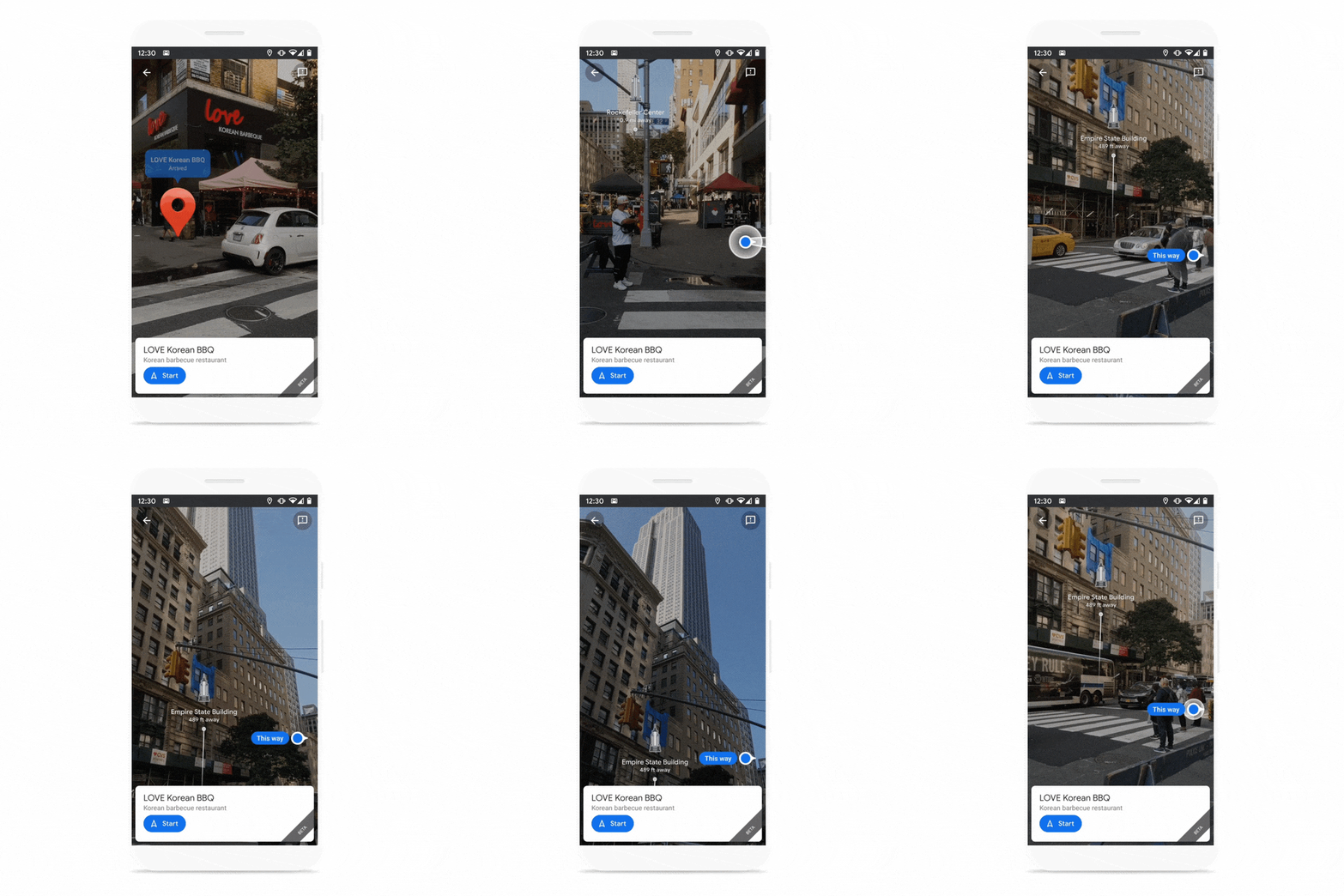
เมื่อคุณเลือกหรือค้นหาสถานที่บน Google Maps คุณสามารถแตะไปที่ Live View เพื่อดูจุดหมายปลายทางของคุณในโลกแห่งความเป็นจริงได้ และในเร็วๆ นี้คุณจะสามารถสำรวจสถานที่สำคัญที่อยู่ใกล้เคียงเพื่อช่วยให้คุณเข้าใจทิศทางและสิ่งแวดล้อมรอบตัวคุณได้เร็วและง่ายขึ้น Live View จะแสดงให้คุณเห็นว่าสถานที่สำคัญแต่ละที่อยู่ห่างจากคุณมากน้อยเพียงใด และคุณต้องไปในทิศทางใดเพื่อไปให้ถึงที่นั่น สถานที่สำคัญเหล่านี้อาจจะเป็นสถานที่สะดุดตา เช่น ตึกเอ็มไพร์สเตทในมหานครนิวยอร์ก และวิหารแพนธิออนในกรุงโรม รวมถึงสถานที่ที่จดจำได้ง่าย เช่น สวนสาธารณะ หรือสถานที่ท่องเที่ยว เป็นต้น
สถานที่สำคัญใน Live View ช่วยให้คุณเข้าใจสิ่งแวดล้อมรอบตัวคุณได้ดีขึ้น
ใช้ Live View ในสถานที่อื่นๆ
ตอนนี้คุณสามารถใช้ Live View ได้จากแท็บขนส่งสาธารณะ (transit) ใน Google Maps ได้แล้ว ย้อนกลับไปในปี 2561 เราได้เปิดตัว การนำทางแบบหลายรูปแบบ (multi-modal navigation) ซึ่งเป็นวิธีการขอเส้นทางสำหรับการเดินทางที่ต้องอาศัยการขนส่งหลายประเภท ทั้งการเดินเท้า การขับรถยนต์ การขี่จักรยาน และขนส่งสาธารณะ ตอนนี้หากคุณใช้เส้นทางขนส่งสาธารณะและมีบางช่วงที่ต้องเดิน คุณสามารถใช้ Live View เพื่อค้นหาเส้นทางของคุณได้ ซึ่งมีประโยชน์อย่างยิ่งเมื่อคุณออกจากสถานีขนส่งและไม่รู้ว่าจะไปทางไหนต่อ
ใช้ Live View ได้โดยตรงจากระบบนำทางขนส่งสาธารณะ

Live View ในการแชร์ตำแหน่ง พร้อมให้บริการบน Android และ iOS เร็วๆ นี้
หากคุณมีนัดพบปะสังสรรค์กับเพื่อนๆ ในสถานที่ที่อยู่ไกลออกไป อาจเป็นเรื่องยากที่จะระบุตำแหน่งที่อยู่ของของพวกเขา เมื่อเดือนที่แล้ว เราได้เปิดตัวฟีเจอร์ Live View ในการแชร์ตำแหน่ง (Location Sharing) ให้กับผู้ใช้ Pixel และเร็วๆ นี้เราจะขยายฟีเจอร์นี้ให้ครอบคลุมผู้ใช้ Android และ iOS ทุกคนทั่วโลก เมื่อเพื่อนแชร์ตำแหน่งให้กับคุณ คุณแค่แตะไปที่ไอคอนของพวกเขา จากนั้นแตะปุ่ม Live View เพื่อดูว่าพวกเขาอยู่ที่ไหนและไกลจากคุณแค่ไหน โดยจะมีลูกศรและทิศทางต่างๆ ปรากฏขึ้นมาเพื่อช่วยนำทางคุณไปยังที่หมาย
ฟีเจอร์ Live View ในการแชร์ตำแหน่งจะครอบคลุมผู้ใช้ Android และ iOS ทุกคนทั่วโลกที่ใช้อุปกรณ์ที่รองรับ ARCore และ ARKit ในเร็วๆ นี้

การปักหมุดที่แม่นยำมากขึ้น
เพื่อทำให้ฟีเจอร์เหล่านี้มีชีวิตชีวา เราได้ทำการปรับปรุง Global Localization ซึ่งเป็นเทคโนโลยีพื้นฐานที่ขับเคลื่อนฟีเจอร์ Live View ทั้งหมดบน Google Maps เช่นตอนนี้ ด้วยพลังของแมชชีนเลิร์นนิงและ ความเข้าใจอย่างลึกซึ้งของเราเกี่ยวกับภูมิประเทศของโลก ทำให้เราสามารถพิจารณาระดับความสูงของสถานที่ เพื่อช่วยให้การแสดงตำแหน่งของจุดหมายปลายทางที่ปักหมุดไว้ใน Live View มีความแม่นยำมากขึ้น ในรูปด้านล่างนี้คุณจะเห็นว่าถนนลอมบาร์ด (Lombard Street) ซึ่งเป็นถนนที่สูงชันและคดเคี้ยวแห่งหนึ่งในซานฟรานซิสโก อยู่ห่างออกไปไกลมาก ตอนนี้คุณจะเห็นว่าถนนลอมบาร์ดอยู่ใกล้มากขึ้น และหมุดจะอยู่ในแนวเดียวกับจุดเริ่มต้นของถนนที่ด้านล่างของเนินเขา
การปรับปรุง Global Localization ทำให้แสดงตำแหน่งการปักหมุดที่แม่นยำมากขึ้น

ไม่ว่าคุณจะเดินไปที่ไหน ฟีเจอร์ Live View จะช่วยให้คุณไปถึงจุดหมายได้อย่างมีประสิทธิภาพและปลอดภัยที่สุด คุณจะเริ่มเห็นฟีเจอร์ Live View ในแท็บขนส่งสาธารณะ (Transit) และการแชร์ตำแหน่ง (Location Sharing) บน Android และ iOS ในอีกไม่กี่สัปดาห์ข้างหน้านี้ ส่วนการแสดงสถานที่สำคัญก็จะเริ่มเปิดตัวเร็วๆ นี้ ทั้งบน Android และ iOS ในเกือบ 25 เมืองทั่วโลก* และจะมีเมืองอื่นๆ เพิ่มเติมเข้ามาอีกในภายหลัง
*อัมสเตอร์ดัม กรุงเทพมหานคร บาร์เซโลนา เบอร์ลิน บูดาเปสต์ ดูไบ ฟลอเรนซ์ อิสตันบูล กัวลาลัมเปอร์
เกียวโต ลอนดอน ลอสแอนเจลิส มาดริด มิลาน มิวนิค นิวยอร์ก โอซาก้า ปารีส ปราก โรม ซานฟรานซิสโก ซิดนีย์ โตเกียว เวียนนา
A new sense of direction with Live View

Live View in Google Maps helps you keep your bearings so you can find your way around. With new ways to use Live View, we're making it even easier to orient yourself in the world whether you’re walking around, leaving a public transit station or meeting up with friends.
We launched Live View last year, and since then it’s helped people get around efficiently–especially during the pandemic, when getting from place to place as directly as possible is top of mind. Thanks to augmented reality (AR), you can see arrows, directions, and distance markers placed right on top of your world so you spend less time figuring out which way you should be headed.
Use landmarks to orient yourself in Live View
When you select or search for a place on Google Maps, you can already tap on the Live View button to visualize your destination in the real world. Soon, you’ll also be able to see nearby landmarks so you can quickly and easily orient yourself and understand your surroundings. Live View will show you how far away certain landmarks are from you and what direction you need to go to get there. These landmarks can include iconic places, like the Empire State Building in New York and the Pantheon in Rome, and easily recognizable places, like local parks and tourist attractions.
Seeing landmarks in Live View helps you better understand your surroundings.
Get Live View in more places
You can now access Live View right from the transit tab in Google Maps. Back in 2018, we launched multi-modal navigation –a way to get directions for a trip that involves a combination of transportation types, including walking, driving, biking and transit. Now, if you’re using transit directions and have a walking portion of your journey, you can use Live View to find your way. This is particularly useful when you exit a transit station and don’t know which way to go.
Use Live View right from transit navigation.
Live View in Location Sharing–soon available on Android and iOS
If you’re meeting up with friends for a socially distant gathering, it can be hard to pinpoint exactly where they are. Last month , we launched Live View in Location Sharing for Pixel users, and we’ll soon expand this to all Android and iOS users around the globe. When a friend has chosen to share their location with you, you can easily tap on their icon and then on Live View to see where and how far away they are–with overlaid arrows and directions that help you know where to go.
Live View in Location Sharing will soon expand to all Android and iOS users globally on ARCore and ARKit supported phones.
A more accurate pin
To bring all of these features to life, we’ve made improvements to global localization, the underlying technology that powers all Live View features on Google Maps. With the help of machine learning and our understanding of the world’s topography, we’re able to take the elevation of a place into account so we can more accurately display the location of the destination pin in Live View. Below, you can see how Lombard Street—a steep, winding street in San Francisco—previously appeared far off into the distance. Now, you can quickly see that Lombard Street is much closer and the pin is aligned with where the street begins at the bottom of the hill.
Improvements to global localization now show a more accurate pin placement.
No matter where you’re walking, Live View can help you get there as efficiently as possible. You’ll start seeing Live View in the transit tab and Location Sharing on Android and iOS in the coming weeks, along with a more accurate pin. Landmarks start rolling out soon on Android and iOS in nearly 25 cities* around the world, with more to come.
*Amsterdam, Bangkok, Barcelona, Berlin, Budapest, Dubai, Florence, Istanbul, Kuala Lumpur, Kyoto, London, Los Angeles, Madrid, Milan, Munich, New York, Osaka, Paris, Prague, Rome, San Francisco, Sydney, Tokyo, Vienna