Chrome Security
Bringing AI agents to Chrome Enterprise security management
Chrome Enterprise gives IT and security teams granular control over browser security—enrollment, reporting, DLP, connectors, Safe Browsing—across every organizational unit. At scale, tasks like a full security posture review or a cross-org-unit DLP rollout can involve dozens of manual steps in the Google Admin console. The underlying work is methodical and since the Admin console is implemented on top of a robust set of APIs, this type of work is a natural fit for an AI agent.
To help teams deploying agentic workflows, we’re launching an open-source MCP server that connects to the Chrome Enterprise APIs and exposes these operations as tools an agent can call. This can help speed up many management and security related tasks associated with enterprise browsers, and gives IT and security teams faster tools to deploy company policies across managed and unmanaged devices.
You describe what you need in plain language—through the Gemini CLI, or other MCP-compatible clients—and the agent handles calling the right APIs. You can converse with it in natural language and have it review recent DLP events and suggest improvements:
You can also use shortcuts to complete complex actions, such as reviewing your configuration (just type /cep:health), auditing and improving your rules (/cep:optimize), or pulling in expert guidance on a specific question (/cep:expert). And you can explore logs, usage patterns, and opportunities for streamlining policies in the same conversation.
See it in action
Let’s look at three areas where the MCP server can help give faster visibility, save time in configuring data protection and even streamline investigation.
Troubleshooting your deployment
Something's off—maybe a new org unit was provisioned but never fully configured, or browser versions are drifting. Type /cep:health and the agent calls the diagnose_environment tool to walk your org structure, checking subscription status, connectors, and browser distribution:
The health check flags missing security connectors or inactive rules as critical issues. You can then tell the agent to "Enable the reporting connector for the whole org," and it will use the enable_chrome_enterprise_connectors tool to fix it quickly, without having to manually enable the settings in Admin.
Creating a DLP rule
Let’s look at an example that involves simplified DLP. Suppose you need a DLP rule to protect against credit card numbers being leaked across your organization. Normally that means navigating the rule builder, getting the policy expression syntax right, and applying it to the correct scope. With the MCP server, the agent handles the CEL (Common Expression Language) syntax and validation for you.
The server creates the content detector and configures the rule—file upload trigger, warn action, applied org-wide—and confirms the details. Every rule created by the agent is automatically prefixed with 🤖 so you can easily distinguish them from human-created policies in the Admin Console.
Investigating noisy alerts
Sometimes internal policies or governance models can create more friction for end users than intended, and organizations need to revisit some of the policies they put in place. Members of the sales team are getting Chrome security warnings every time they paste into their CRM. Which rule is doing it, and why?
The agent uses get_chrome_activity_log to correlate recent events with your active list_dlp_rules. It identifies the specific rule firing, shows the affected users, and recommends how to narrow the condition—without requiring an Admin to manually correlate logs and shuffle multiple screens.
Flexibility for your own workflows
The server is an MCP endpoint, so it's not tied to any particular client. This gives you the freedom to build custom logic, for use cases like:
- Internal admin dashboards. Add the server as a backend for a web-based admin tool your security team already uses. Non-CLI users can run health checks and policy reviews without switching to a terminal.
- Scheduled posture checks. Wire the server into a cron job or CI pipeline that runs diagnose_environment on a schedule and alerts on regressions—a new org unit missing connectors, DLP rules stuck in audit-only mode, or browser versions falling behind.
- Multi-tool agents. Build agents that combine Chrome Enterprise data with signals from your SIEM or endpoint management tools, correlating browser-level DLP events with network-level alerts.
Getting started
You’ll need a Chrome Enterprise Premium subscription to take full advantage of DLP features; learn more and get a free trial at chromeenterprise.google.
The agent provides suggestions for your review and does not replace professional security auditing. You must manually review and enable rules in the Admin Console to prevent accidental data loss.
- Prerequisites: Node.js 18+, the gcloud CLI, a Google Cloud project.
- Install: Add the server to your MCP client's settings file (the README has snippets for Claude Desktop, Claude Code, VS Code, and Gemini CLI). The Quick Start walks through every step. Below is an example for Gemini:
"mcpServers": {
    "cep": {
      "command": "npx",
      "args": ["-y", "@google/chrome-enterprise-premium-mcp@latest"],
      "env": { "GCP_STDIO": "true" }
    }
}- Authenticate: Follow the auth steps in the README.
Try it out, share your feedback, or submit a PR—the repo is at google/chrome-enterprise-premium-mcp on Github. This reference implementation is not an officially-supported Google product.
We’ve also built a simple React application, pocket-cep, that you can clone yourself for an example of how you can start using the MCP server to power your own applications and scripts:
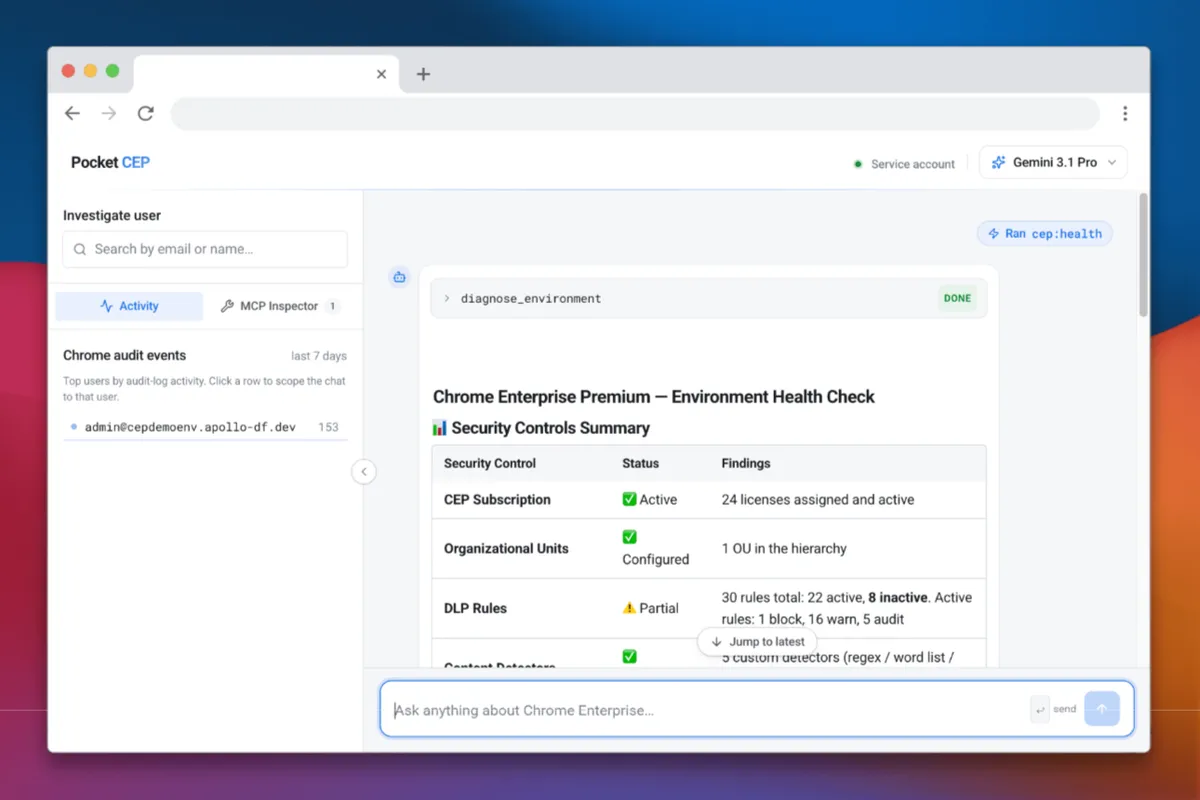
We're excited to see what you build and welcome your feedback at cep-mcp-feedback@google.com.
Screenshots and results are for illustrative purposes. Check the responses for accuracy. Screen images simulated. Subscription and setup may be required. Requires internet connection, and intended for users 18+.