4 new ways Android is protecting your network connections

Every day, we rely on networks to stay connected to the world, whether we're keeping in touch with loved ones, streaming music, or managing our finances. But as our connections grow, so do the tactics of scammers and digital snoops.
To stay ahead of these threats, we’re constantly upgrading Android with powerful new protections designed to keep you safe. We’re introducing a suite of advanced network security features that secure your connections, defend against cellular vulnerabilities, and help keep your home network private.
Hiding your digital destination from network snoops
When you visit a website or use an app, even if the connection is encrypted by HTTPS, the domain names of the sites you visit are still visible to network operators and eavesdroppers. This unencrypted data can be used to build user profiles or, in the hands of malicious actors, leveraged for targeted phishing and scam campaigns.
Android 17 is introducing support for Encrypted Client Hello (ECH). This new privacy standard works in tandem with private DNS to obscure the domain names you visit, hiding metadata that can be used to profile you. By encrypting the destination website name from the very start, ECH helps ensure that, for supported websites and apps, network providers and network snoopers can no longer easily see which websites or apps you are accessing. In partnership with Jigsaw, we are working with industry leaders, service providers, and app developers to accelerate ECH adoption. Learn more about Jigsaw’s research on ECH in their blog. With this launch, Android 17 sets a landmark precedent as the first major mobile OS to enable broad ECH support.
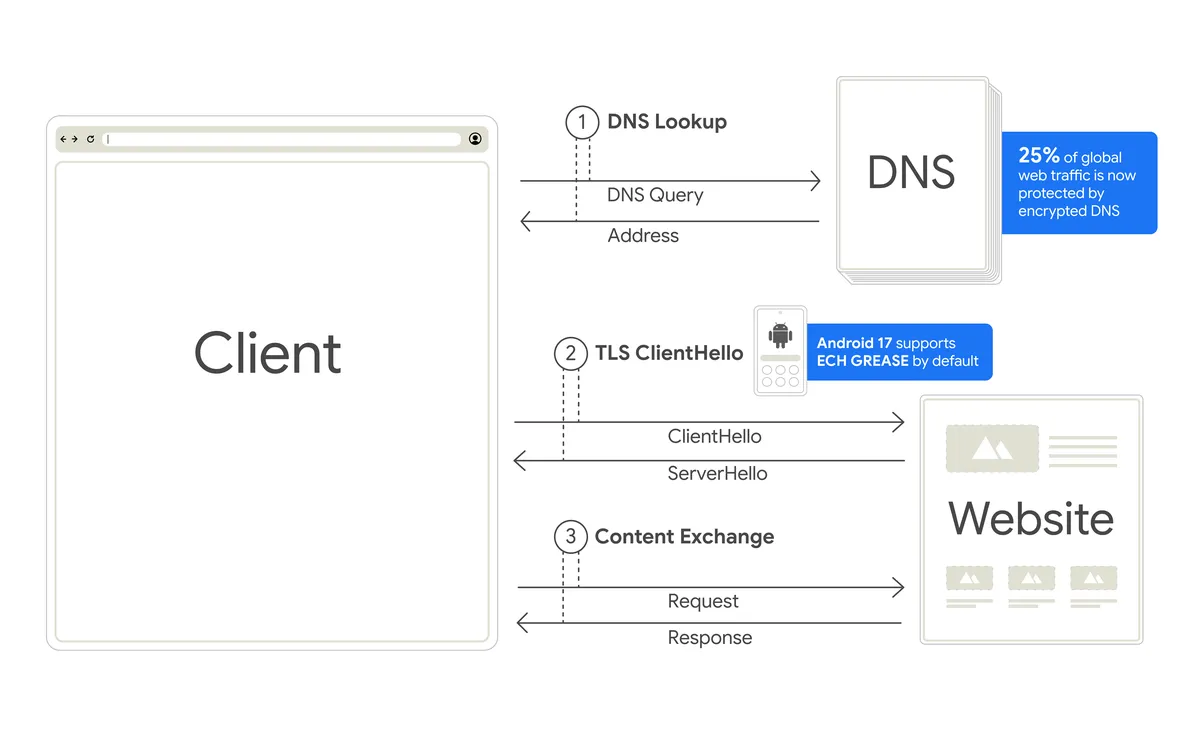
To adopt these modern networking libraries and best practices, Android app developers should upgrade to OkHttp 5.5.0 and enable ECH. Developers building or configuring network stacks should also consult our technical recommendations on GitHub for optimizing HTTPS RR queries for the best performance.
Keeping your Wi-Fi network private and secure
When you connect your phone to your home Wi-Fi, you share that network with other devices, like your smart TV, security cameras, or gaming consoles. Previously, apps could scan your local network to see what other devices were connected without your permission, which could be used to build profiles of your household.
Local Network Protection is now enforced starting in Android 17 to help keep your local network secure. Apps must now ask for your permission before they can scan or connect to other devices on your local network. For everyday tasks like casting a video to your TV, developers should adopt a secure system tool, which allows you to select your TV without the app ever needing permission to see the other devices in your home.
Preventing impostors from intercepting your web traffic
When you connect to a secure app or website, your device verifies a certificate to confirm the site is authentic. However, if a certificate issuer is compromised, hackers could potentially create fake certificates to intercept your traffic and cause harm. To address this, Android is enabling Certificate Transparency (CT) by default, requiring all certificates to be logged in a public registry, making such an attack much less likely to go unnoticed.
Closing a security loophole to block 2G text scams
Scammers are increasingly turning to portable devices known as "SMS blasters" or false cellular base stations to target mobile users in dense public spaces. With hardware costs dropping to as low as $3,000, criminals can covertly deploy these units anywhere, from vehicle-mounted setups causing millions of cellular network disruptions in busy downtown corridors like Toronto to fraudsters carrying portable, suitcase-style blasters through London Tube stations to target commuters.
These devices operate by broadcasting high-power signals that force nearby smartphones to drop their LTE or 5G connections and downgrade to less secure, legacy 2G networks. Once a phone is on a 2G network, scammers can bypass modern spam and scam filters to deliver realistic phishing texts directly to victims' devices.
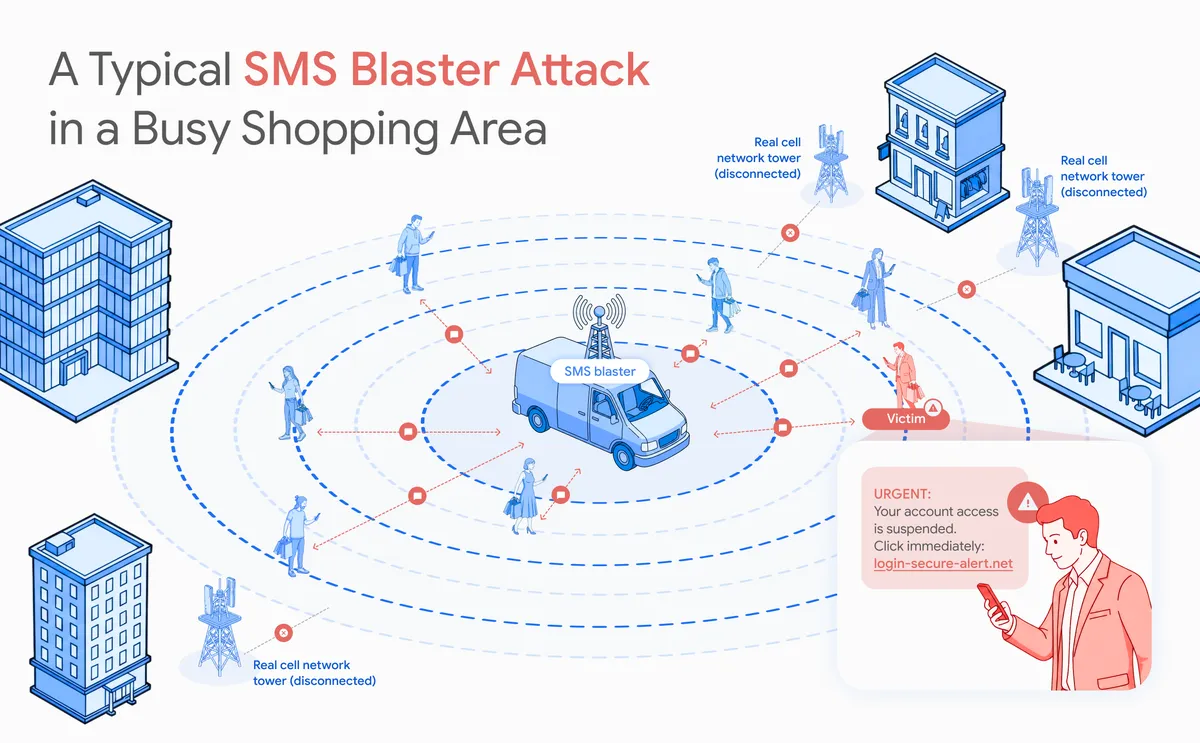
To address this legacy vulnerability, Android 12 introduced a manual toggle allowing users to disable 2G at the hardware level. We have evolved this defense further in Android 17 by introducing a zero-click solution, empowering mobile carriers to turn off 2G by default for their subscribers. For participating carriers, this helps eliminate the legacy attack surface out of the box, proactively mitigating a primary method used by SMS blasters before they can target your device.
Building a safer mobile future
Your privacy and security should never be a compromise as technology evolves. These new Android 17 protections work seamlessly behind the scenes so you can connect, browse, and communicate with peace of mind. As new digital threats emerge, we remain committed to keeping Android at the forefront of mobile security, ensuring the control of your personal data stays where it belongs: in your hands.
Acknowledgements
Special thanks to Abbie Farr, Bessie Jiang, Mark Cwalinski, Sandro Montanari, and Yomna Nasser for their invaluable contributions to bringing these security features to the Android community.