Smoother scrolling: How we halved scroll jank in Chrome on Android

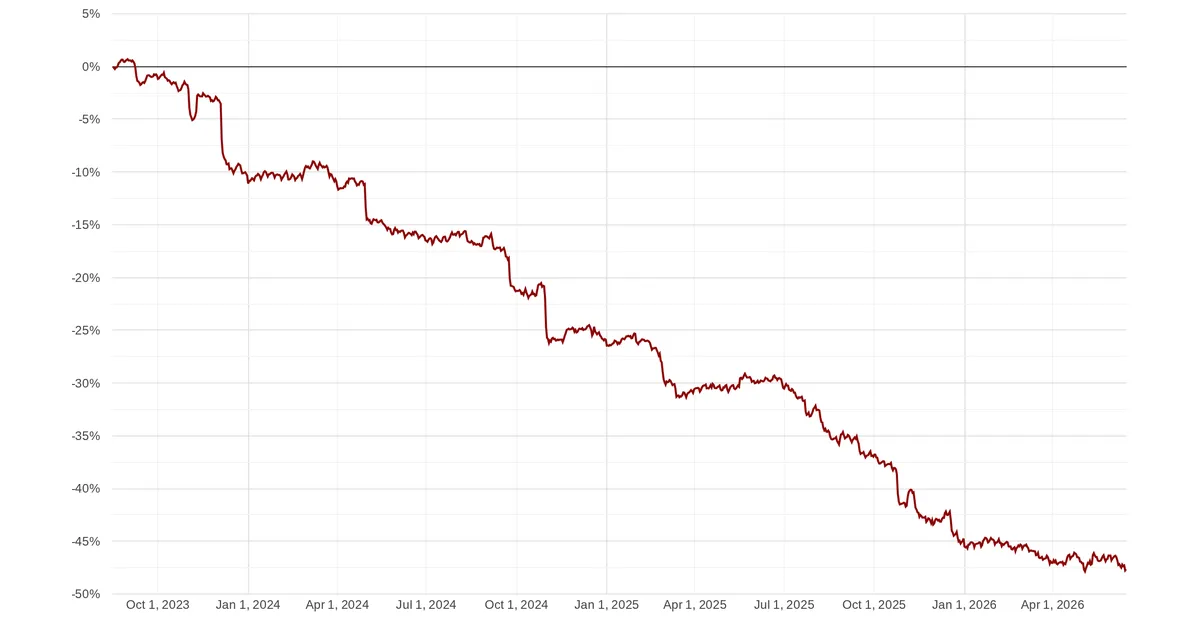
We’ve all experienced it: you’re scrolling through an article on your phone, and the page suddenly stutters or jumps. That frustrating hiccup is scroll jank, and it’s one of the biggest disruptors of a great mobile web experience. Android has recently set a new record and become the fastest mobile platform for web browsing, but there’s more to a great user experience than raw speed. Back in 2023, we embarked on a journey to eliminate the root causes of scroll jank. Today, we’re sharing how we reduced the frequency of janky scrolls in Chrome on Android by 48%.
Change in frequency of janky scrolls in Chrome on Android between 2023 and 2026.
Consistency is the real key
Users experience scroll jank when their device fails to present a frame containing an updated scroll offset on time.
A smooth scroll (left) and a janky scroll (right).
Chrome has a strict deadline to deliver each frame before the screen refreshes. If a delay pushes the processing of a frame past this deadline, the screen is forced to display a stale scroll offset for an entire refresh cycle—roughly 16.7 milliseconds on a 60 Hz display. The human eye perceives this missed frame as a jarring, jerky stutter. Avoiding jank requires that Chrome’s input-to-frame delivery is consistent—every scroll update must take the same time to be presented on screen.
Consistent input-to-frame delivery, resulting in a smooth scrolling experience.

Inconsistent input-to-frame delivery, resulting in a janky scrolling experience.

Maintaining consistent input-to-frame delivery is more difficult for Chrome than for most Android apps. To understand why, let’s consider what an app needs in order to present a scroll animation on the screen:
- Input events, which inform the app about the position of the user’s finger on the screen, allowing it to calculate the scroll offset.
- VSync signals, which act like a metronome for the device and are sent by the OS once per refresh cycle so that the app knows exactly when it’s time to produce the next frame.
A traditional Android app receives both a single buffered input event and the VSync signal together and then produces a frame. All of this happens on a single thread.
Input-rendering pipeline in a traditional Android app.

In contrast, Chrome has separate browser, renderer, and GPU processes. This model improves stability, security, and performance, but it also makes things more complicated: When the user touches the screen in Chrome, the hardware generates an input event, which doesn’t just go to one thread or even one process. It first arrives in the browser process for hit testing and gets forwarded to the renderer process to calculate the new scroll offset. VSync signals follow a different path, also across multiple processes. They arrive on the Viz compositor thread in the GPU process and get forwarded to the renderer process, which matches them with input events to draw a new frame. The frame is then sent to the GPU process to produce pixels in a GPU buffer, which the OS finally displays on the screen. To make things even more complicated, Chrome consumes unbuffered input directly from the hardware. This means that input events arrive in Chrome at irregular intervals, often multiple times per refresh cycle.
Input-rendering pipeline in Chrome.
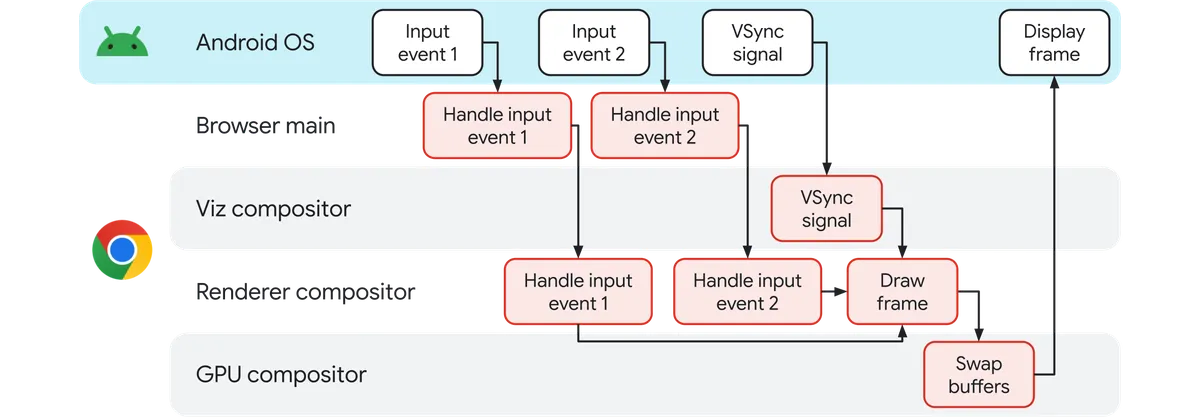
In this intricate multi-process pipeline, there are numerous opportunities for even the tiniest delay to have a domino effect on other processing stages, hurting visual smoothness. If an input event arrives while the browser’s main thread is busy doing something else or cross-process communication takes a few more microseconds than usual, Chrome misses a deadline and the scroll stutters.
Because of this complexity, raw speed isn’t enough to guarantee a good experience—consistency is the real key.
The hunt for jank causes
Understanding the sheer complexity of Chrome’s input-rendering pipeline introduces another challenge: how do we figure out what’s causing scroll jank?
We started by instrumenting all parts of the pipeline—from input generation in the hardware to the presentation of GPU buffers on the screen—using Perfetto trace events. This instrumentation enables us to visually inspect the stages of the pipeline for each scroll update and identify irregularities which cause scroll jank:
Stages of the input-rendering pipeline for each scroll update in a Chrome trace opened in the Perfetto UI.
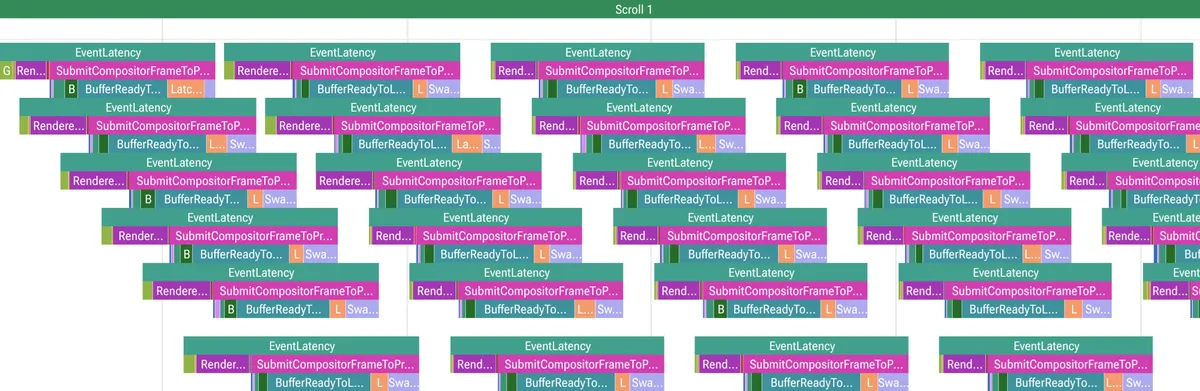
However, manually reviewing traces doesn’t scale and quickly becomes tedious. To find patterns in the trace data, we created a library of PerfettoSQL queries which extract the relevant information from a trace and produce a table where each row corresponds to a single scroll update. The table columns contain various information about the update, including the duration of each stage of the input-rendering pipeline and how much the stage’s duration changed between consecutive scroll updates. We then developed a set of heuristics for automatically tagging a frame with likely causes of jank. For example, if any stage of the pipeline takes longer than the refresh cycle, we tag the stage as a likely culprit.
Distribution of various jank tags on Android. The percentages add up to more than 100% because Chrome’s heuristics might tag a single janky frame with multiple likely causes of jank.

This automated tagging gave us increased visibility into where Chrome was struggling during a scroll.
Reducing scroll jank, again and again
The extensive instrumentation of Chrome’s input-rendering pipeline enabled us to iterate as follows:
- Analyze traces to identify root causes of scroll jank and brainstorm projects to address them.
- Implement the projects and launch them as A/B experiments.
- Evaluate the experiments against performance metrics; launch successful experiments to 100%.
- Repeat.
We went through several such iterations between 2023 and 2026, resulting in the 48% reduction in janky scrolls in Chrome on Android. Here are some of the projects that made this reduction possible:
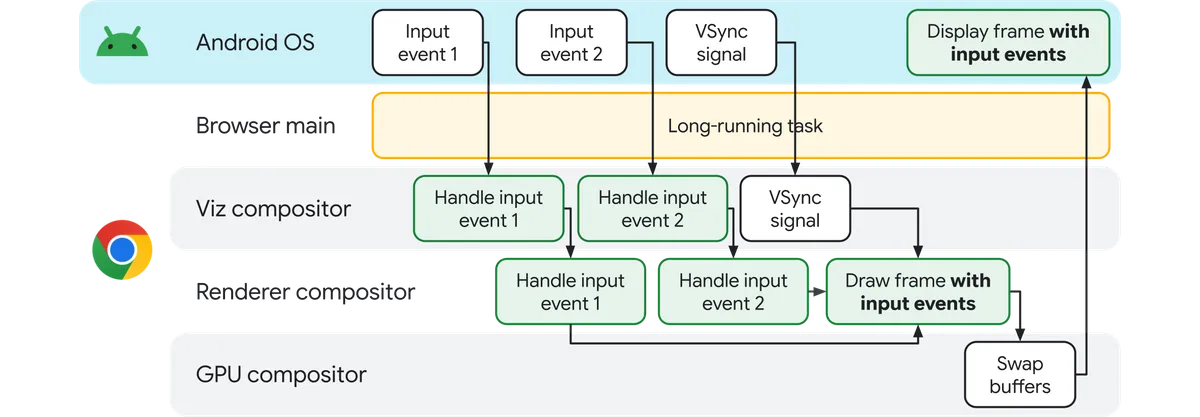
- Input Vizard: Android applications typically receive input events on their main thread. This setup isn’t ideal for Chrome because the browser main thread is one of Chrome’s busiest threads, which makes it an abundant source of non-deterministic delays and therefore jank. We worked closely with Android to allow routing input events to another process. This change removed the browser main thread from the critical path of a scroll. Chrome on Android now receives both input events and VSync signals on the Viz compositor thread in the GPU process, which brings it one step closer to the ideal of scrolling on a single thread like a traditional Android app.
Without Input Vizard, a long-running task on the browser main thread delays input handling, which can cause scroll jank.
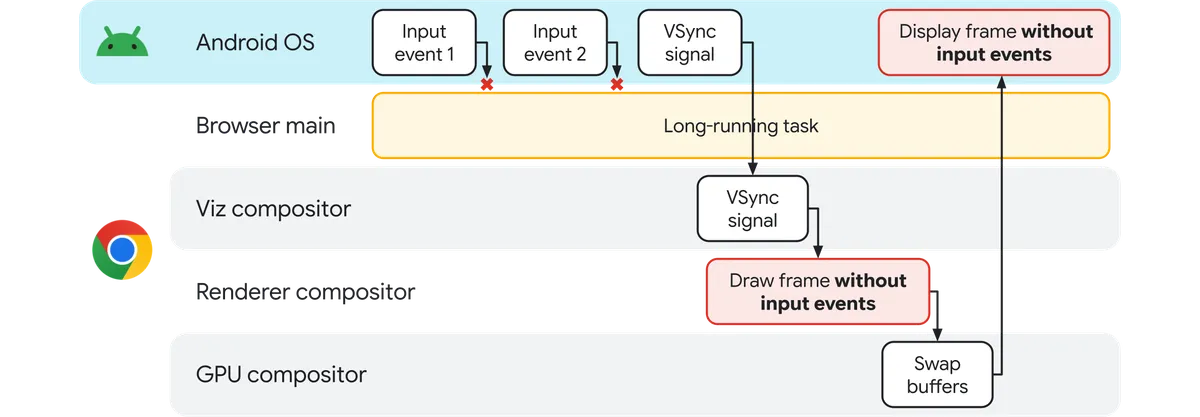
With Input Vizard, Chrome handles input on the Viz compositor thread, so a long-running task on the browser main thread doesn’t cause scroll jank.
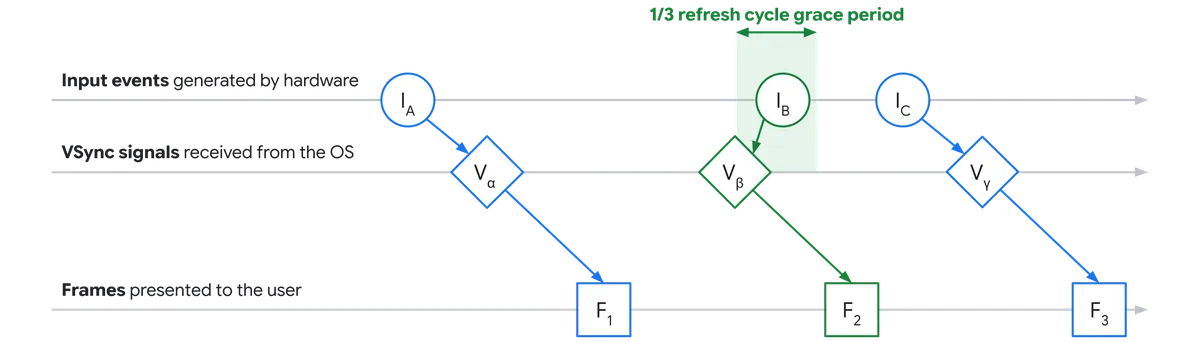
- Input Framer: When Chrome receives a VSync signal, it takes all the input events that it has gathered since the last display update and calculates a new scroll offset as it prepares the next frame. Sometimes, Chrome might not receive any new input events until after it receives a VSync signal because unbuffered input events arrive at irregular intervals. To avoid producing an empty frame containing no scroll updates in this scenario, we altered the renderer process to wait for late input events for up to one-third of the refresh cycle.
Without Input Framer, a late input event which arrives after a VSync signal might cause scroll jank.
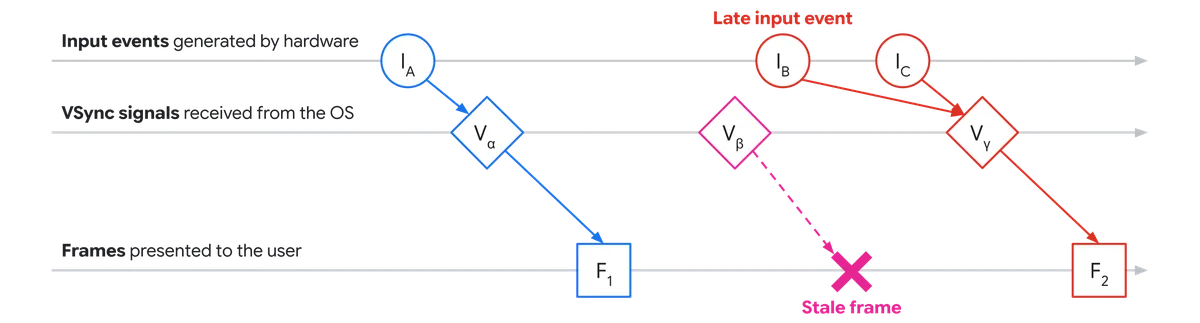
With Input Framer, Chrome can decide to include a late input event which arrives after a VSync signal in the corresponding frame to avoid scroll jank.
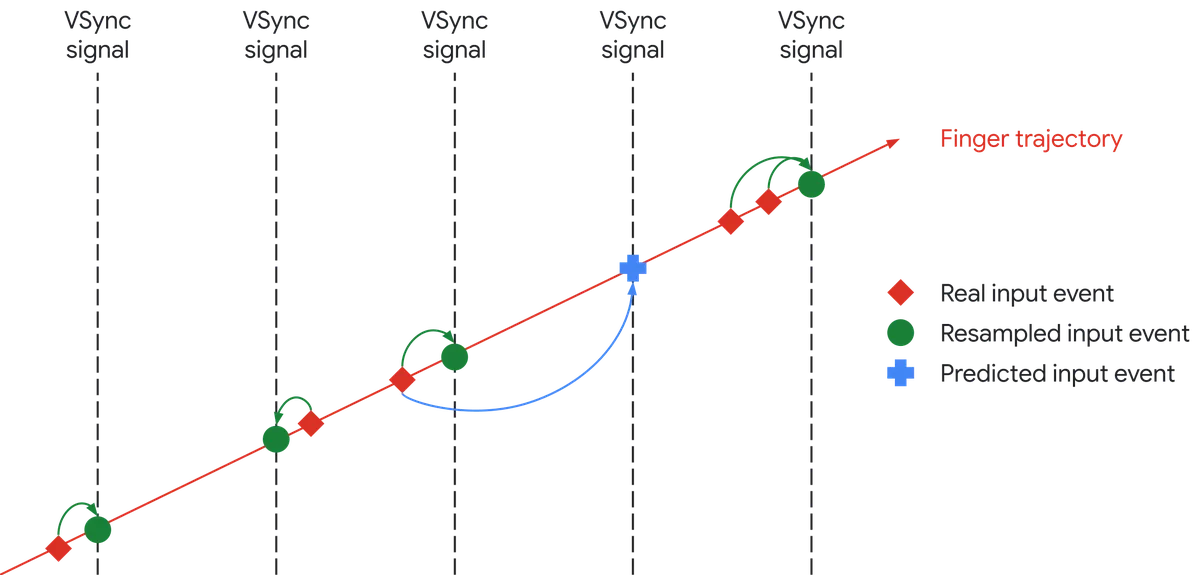
- Input prediction: An input event from the OS can sometimes be so delayed that even Input Framer’s grace period isn’t enough. Extending the grace period even further isn’t an option because it would increase the risk that Chrome wouldn’t be able to produce the frame on time. Instead, if the OS hasn’t delivered any input events by the deadline, Chrome creates its own synthetic scroll update and predicts the future scroll position based on the scroll curve that it has observed so far.
Input prediction makes Chrome less likely to jank due to delays in input delivery.
- Direct2Thread: Cross-process communication in Chrome has historically required hopping through intermediate IO threads. For example, if the browser main thread wanted to send a message to the renderer compositor thread, it had to go through the renderer IO thread and sometimes the browser IO thread, incurring up to three thread hops instead of just one. We removed this requirement on the critical path of a scroll, reducing the latency and non-determinism involved in getting an input event presented on the screen.
Direct2Thread reduces the number of threads involved in cross-process communication.

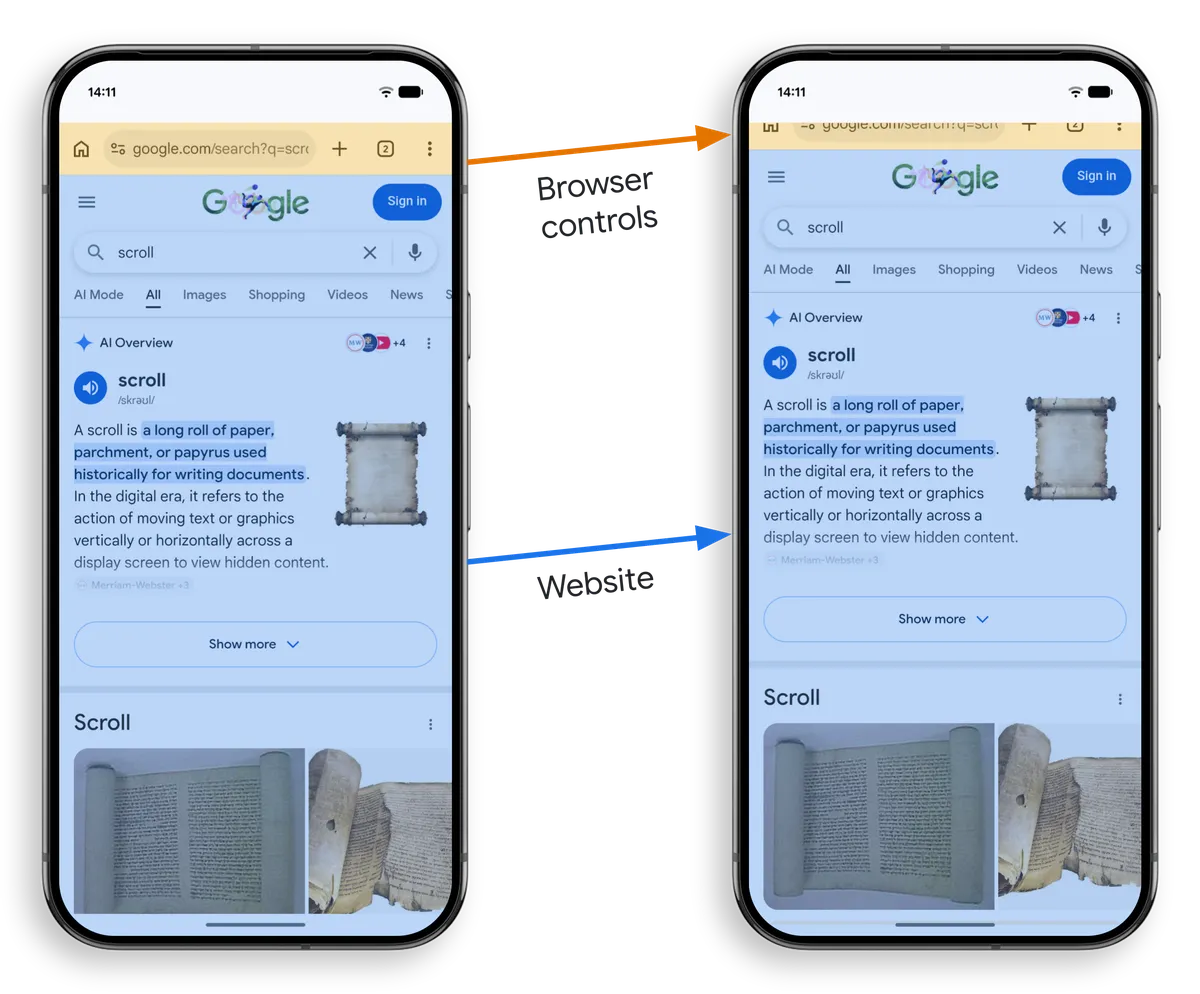
- Browser controls in Viz: When a user starts scrolling down a website on Android, the browser controls slide out of the viewport in lockstep with the website that’s being scrolled. The synchronized movement of the two surfaces used to involve the browser main thread in every single frame, so there were plenty of opportunities for visual hiccups. We changed the architecture so that the GPU process could apply each frame’s scroll offset to the screenshot of the browser controls without talking to the browser main thread.
Browser controls in Viz shifted the responsibility for synchronizing the movement of the browser controls and the website during a scroll from the browser main process to the GPU process.
- Priority of Android input threads: A chain is only as strong as its weakest link. A pipeline is only as fast as the dependency with the lowest priority. We found that input events sometimes took too long to reach Chrome because the relevant OS threads were preempted by other, lower-priority work. We worked with Android to make sure that all threads responsible for delivering hardware input to Chrome have a sufficiently high priority.
Even though our goal was to reduce janky frames, most of our projects involved streamlining the input side of the pipeline. This might seem counterintuitive, but remember that Chrome can’t start preparing a frame unless it knows what scroll offset to apply.
Looking ahead
Web performance on Android is a game of milliseconds. Through relentless trace analysis, automated heuristics, targeted optimizations and deep architectural shifts, we continue to drive down scroll jank to provide our users with a great, smooth web experience on Android and beyond. Stay tuned to The Fast & The Curious as we continue pushing the boundaries of what is possible for mobile web speed!


