New AI Tools to Support India’s Next Generation
To build on our vision of serving as a thoughtful, responsible companion for every learner and teacher in India, we are introducing a new suite of AI tools.
New Student Tools for Active, Personalised Learning
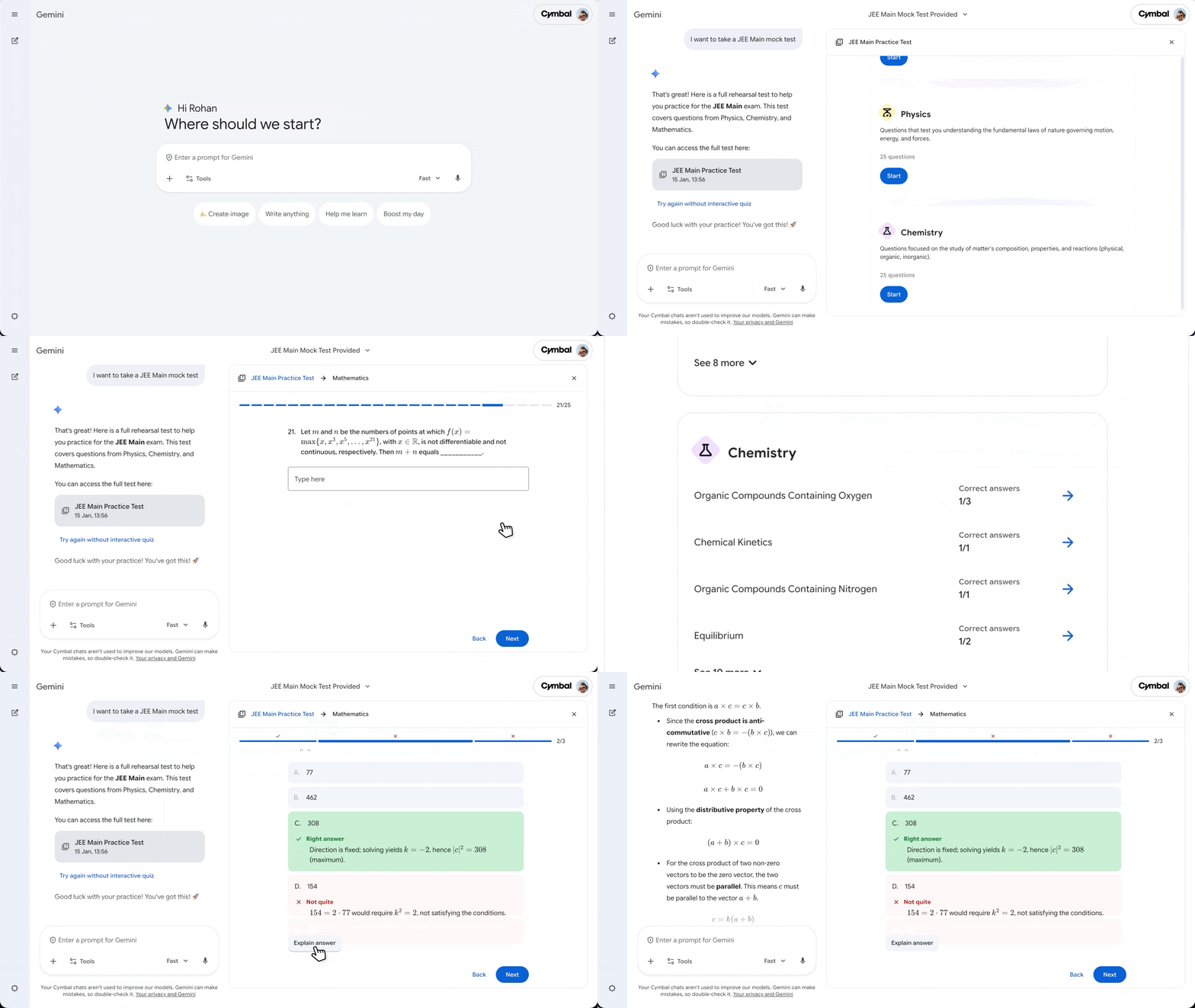
We’re launching full-length practice tests for JEE Main on Gemini, and soon in AI Mode in Search too. We have grounded the practice tests in rigorously vetted content from education companies like PhysicsWallah and Careers360, to build a best in class experience for learners. This helps ensure that you’re not just practicing — you’re preparing with material that more closely resembles what you’ll see on test day. To try it out, just tell Gemini “I want to take a JEE Main mock test”.
When you complete a practice test in Gemini, you’ll receive immediate feedback highlighting where you excelled and where you might need to study more. For anything you don’t understand, you can ask Gemini to explain the correct answer. By helping you identify specific knowledge gaps, Gemini empowers you to turn those insights into action — creating a customized study plan that can help you walk into your exam with confidence.
Next, With AI Mode in Search, students can now build comprehensive study guides and interactive quizzes with the Canvas tool, which has a dynamic side panel that helps you create and refine documents, plans and more.
Simply tell AI Mode what you want to create, attach files like your class notes for additional context, then tap “Get started” in the initial response to open Canvas. AI Mode will bring together relevant information from the web and your uploaded files to create the guide or quiz you need, which you can further refine through follow-up questions—adjusting the depth, complexity, focus, or format—until it matches your exact requirements. And once you’re done taking a quiz in Canvas, you’ll also get feedback on how to improve along with deeper insights into the correct answers, to help you prep better for the future.
Empowering Teachers with AI in the Classroom
- With the new Google Classroom app in Gemini, educators can now draft assignments and summarize student progress using specific class context. These innovations, paired with native audio/video feedback directly within Classroom assignments and deep AI-usage insights, empower teachers to move beyond paperwork and focus on personalized growth. Details here.
- Since launching Gemini in Workspace, educators have told us that integrated AI saves them hours each week. To bring these benefits to more classrooms, we are making select features — like AI-powered email summarization in Gmail and creative image generation in Slides — more accessible across our Education core editions. Furthermore, Google Workspace Studio now allows educators to build bespoke, no-code AI agents to handle their most complex workflows. Details here.
Security and Responsible AI
- As AI and education technology continue to evolve, ensuring a secure and trustworthy learning environment is more critical than ever. We’re deploying tools to help the education community determine whether the content they're interacting with was created or edited using AI. You can detect images and videos created or edited by Google AI using SynthID, our invisible digital watermark. Simply upload the media to the Gemini app and ask, “Is this AI-generated?” This is just the first step. Over time, we plan to expand this verification to audio files and non-Google models as well.