What’s New in Android Security and Privacy in 2026
We’re always strengthening and growing Android’s industry-leading, AI-powered protections and advanced safeguards to ensure that every user is shielded from the evolving landscape of threats. As we look ahead at the rest of 2026, our focus is on scaling these intelligent defenses to be even more seamless and powerful.
Enhancing our protections for banking scam calls
Scammers are impersonating financial institutions to trick users into transferring money or revealing their account information. Using internet-based calling systems to change their caller ID, also known as “spoofing”, scammers can make their call appear as if it’s coming from a familiar, trusted business, like your bank or financial institution. These spoofed calls are one of the drivers of social engineering scams and financial fraud, which cause an estimated $980M in annual losses worldwide 1 .
To combat this, we’re working with select banks and financial institutions to help protect their customers with verified financial calls, a new phone call spoofing protection feature designed to keep your money and personal information safe. It protects users by automatically ending phone calls from spoofed numbers impersonating participating financial apps.
If you have a participating bank or financial institution’s app installed and have signed in, Android works quietly in the background to verify incoming calls.
- When you receive a call that appears to be from your bank or financial institution, Android asks the app for confirmation to see if they are actually calling you.
- If the app confirms that no phone call is being made, the system ends the call.
- Your bank or financial institution may also designate numbers as inbound-only, meaning they never use them to call customers. Incoming calls from these numbers will be ended directly.
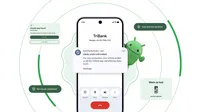
This feature can notify you that an incoming call was likely from a scammer impersonating your bank
We’ll begin rolling this out on Android 11+ devices with Revolut, Itaú, and Nubank in the coming weeks, before expanding it to more banks later this year. To learn more about how interested banks and financial apps can participate, please see our developer documentation.
Expanding Live Threat Detection, Chrome app safety, and Advanced Protection
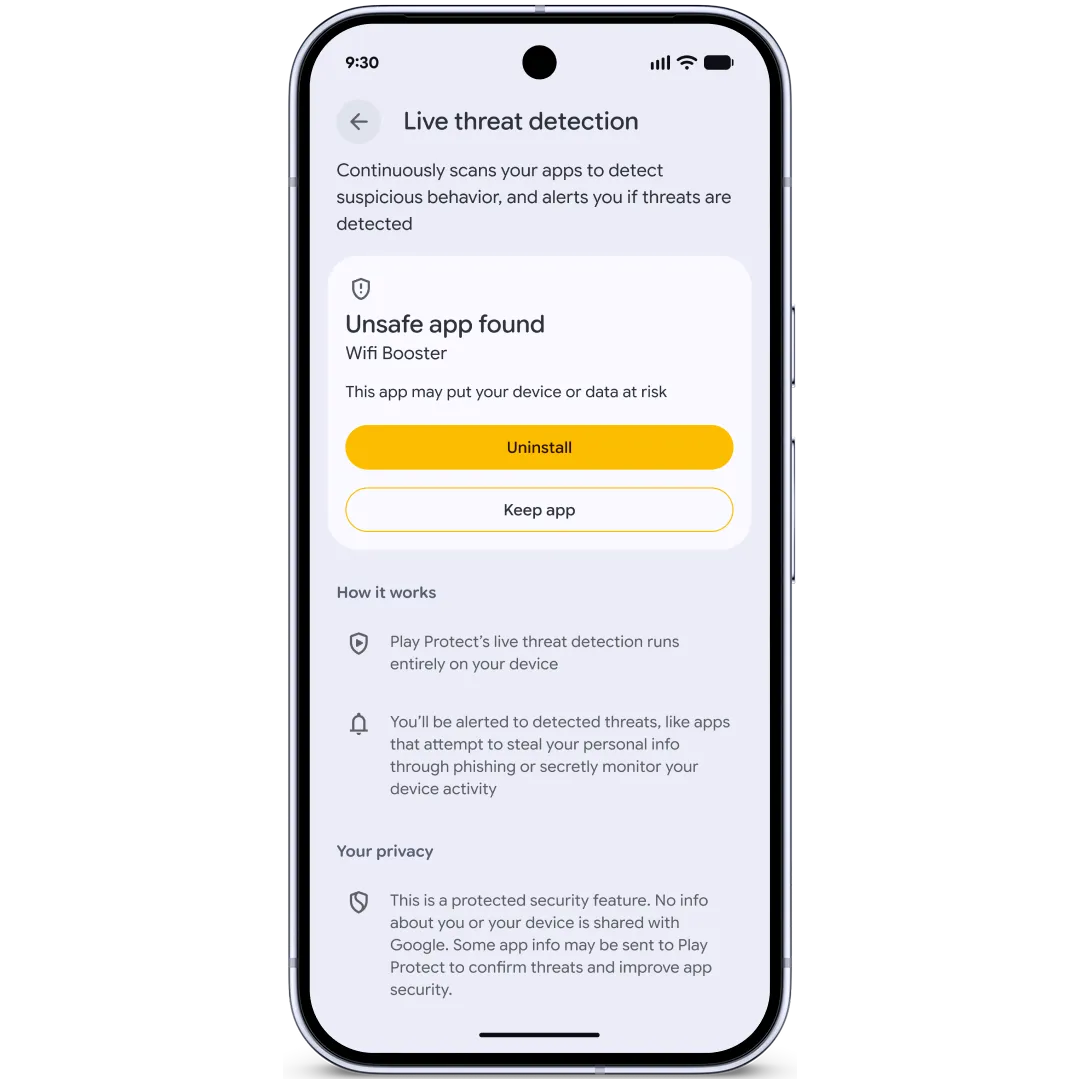
Live Threat Detection is a real-time security feature that uses on-device AI to analyze app behavior and alerts you if an app starts acting suspiciously. We’re enhancing this protection to find and protect against more apps looking to scam or abuse users.
First, we’re rolling out new warnings about suspicious behavior that could be potentially harmful. This covers SMS forwarding, where an app forwards a message to another number, and accessibility overlay, in which an app uses the accessibility permission to continuously display imperceptible content on the screen that could be used to trick you into taking an unintended action.
With dynamic signal monitoring, we’re taking a big step forward in detecting abusive behaviors by monitoring application system interaction for known suspicious patterns in real time. That allows us to warn you about apps that start doing things like changing or hiding their icon and then launching from the background or abusing accessibility permissions. We’re also able to push down rules dynamically to better protect against new and emerging threat behaviors. Dynamic signal monitoring will be enabled on Android 17 devices, with protections rolling out in the second half of the year 2 .
Live threat detection can notify you that an unsafe app was found
For Chrome on Android, we’re improving app safety by adding another layer of protection at download time. If you have Safe Browsing turned on and want to download an app, we’ll evaluate the APK for known malware and stop you before you download it.
Last year we launched Advanced Protection, which enables our strongest protections against scams, fraud, and targeted attacks through a single toggle on your Android device. We’ve been continuously enhancing the protections with key upgrades like USB protection and Intrusion Logging, a capability that we developed in partnership with Amnesty International and Reporters Without Borders, among others. Intrusion Logging enables persistent and privacy-preserving forensics logging to allow for investigation of devices in the event of a suspected compromise. USB protection is now available in Advanced Protection on all Pixel devices running Android 16+, and it will be coming to more Android devices soon. Intrusion Logging is currently rolling out to all devices running the Android 16 December update and newer.
Now, with Android 17, we’re expanding our core advanced protections by removing access to the accessibility service from all apps that are not labeled as accessibility tools. We’re also disabling device-to-device unlocking and Chrome WebGPU support and integrating scam detection for chat notifications. Later in the year, we’re enabling Android Enterprise support for Advanced Protection, so organizations can turn on this protection by policy for managed devices.
Providing stronger protections against device theft
We’ve continued focusing on protecting users against device theft because a lost device not only represents the cost of the phone, but can often lead to financial loss through fraud. We recently announced updates to strengthen our protections against theft, including added controls for Failed Authentication Lock and expanded protection with Identity Check.
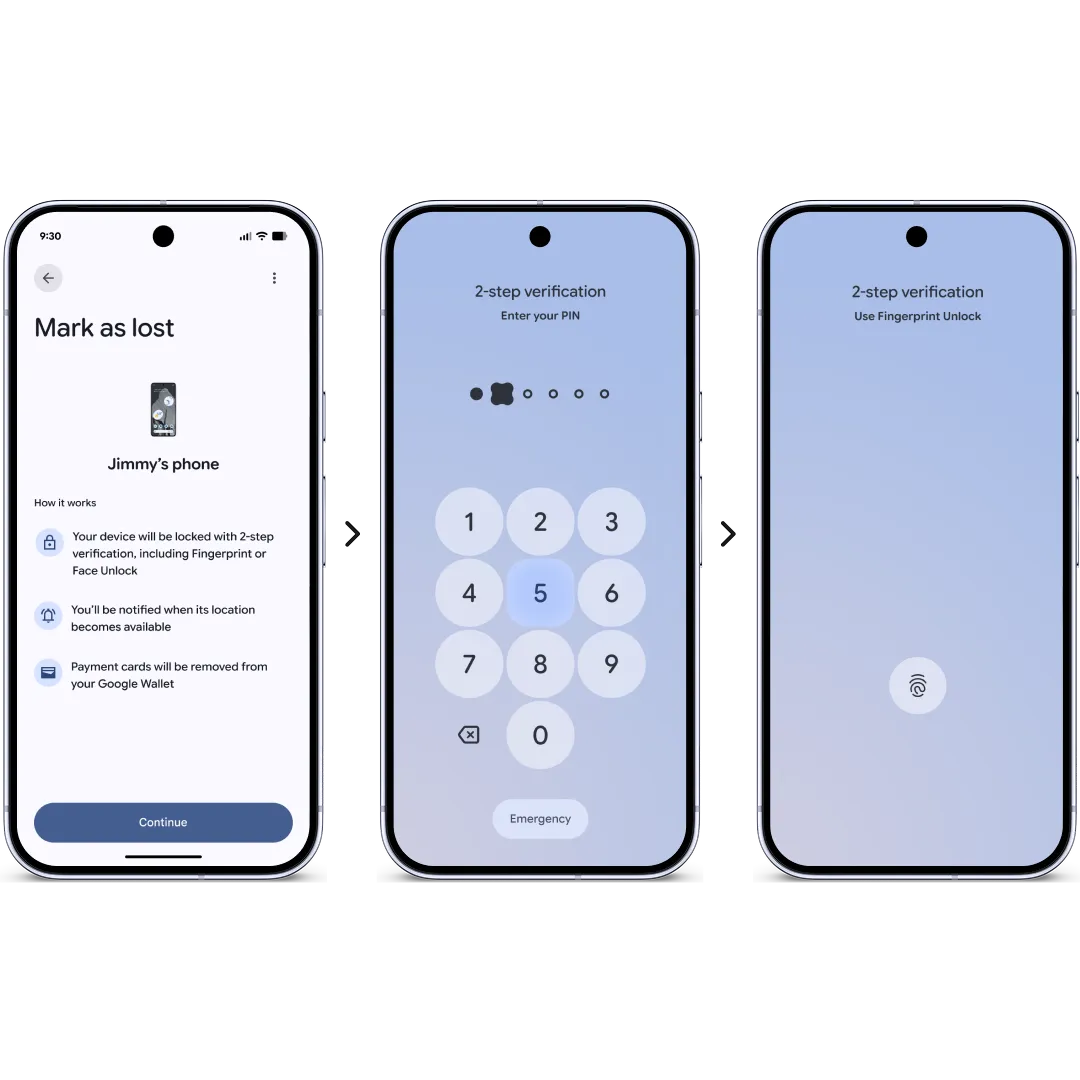
We’re enhancing Find Hub’s Mark as lost feature in Android 17 with the ability to lock a phone with biometric authentication, in addition to the regular device passcode or PIN. This means that thieves who may have obtained your passcode or PIN won’t be able to turn off device tracking or re-access your phone if you mark it as lost. Triggering Mark as lost also enables additional protections like hiding Quick Settings and disabling new Wi-Fi and Bluetooth connections.
When you mark a device as lost, it adds a biometric requirement to unlock the device
Following a successful pilot in Brazil, we are expanding default-on theft protections globally to help protect more users. These features will now be enabled by default on all new Android 17 devices, as well as those freshly reset or upgraded to the latest OS. Additionally, in markets with high demand, including Argentina, Chile, Colombia, Mexico, Peru, and the UK, we are extending these protections to all devices running Android 10 or higher. Once active, features like Remote Lock and Theft Detection Lock will be automatically enabled, providing immediate protection if your device is snatched or stolen.
With Android 17, we are making it harder for thieves to access your data. On supported devices, we've significantly reduced the number of times someone can guess the PIN or password, and added longer wait times between failed attempts. This shuts down attackers who try to rapidly guess their way into your phone. We've also made several refinements to how the lock screen shows information after failed attempts have been made.
To streamline device recovery, a device’s IMEI can now be accessed via the lock screen on devices running Android 12 or higher. Law enforcement, device manufacturers, or mobile network operators can use this unique device identifier to quickly verify device ownership and return it to you. This feature can be disabled at any time in your device settings.
Strengthening controls to protect your privacy
To give users more control of location sharing, in Android 17 we’re introducing a new location button that allows users to share their precise location temporarily for specific tasks while a specific app is open. This is ideal for quick tasks, like finding a nearby cafe, as it grants access for that exact moment without requiring permanent permissions and repeated prompts. By ensuring data is shared only during active use, this update offers a significant privacy win that eliminates unnecessary tracking while keeping you in total control of your location details.
You can give an app temporary location access that can only be used while that app is open
We’re also elevating location access transparency so it’s even more clear when an app is using your location. Similar to camera and microphone indicators, this updated location indicator will appear at the top of your screen when your location is accessed. You can tap the indicator to see exactly which apps have recently accessed your location and manage those permissions immediately through a "Recent app use" dialog.
Finally, we’re giving you more privacy and control when providing contact access to other apps with our new contact picker. In the past, apps often had to request broad access to your entire address book just to connect you with a single friend. Now, developers have a new, intentional way to ask for access to specific contacts only. Apps requesting contacts access can also specify which fields they need, and access to the contacts will be temporary to help ensure you only provide limited access. Many apps will be encouraged to use the location button and contact picker to comply with Google Play policy.
Enhancing AI security and privacy
Private Compute Core (PCC) and Private AI Compute continue to be our way of securing ambient data. To fortify these privacy guarantees with verifiable, hardware backed, on-device isolation, Android 17 introduces AISeal with pKVM. These cutting-edge technologies create a secure environment where ambient data can be processed securely.
And with the launch of Gemini Intelligence, we’ve grounded our approach to security and privacy in three core principles: explicit user control, comprehensive data protection, and operational transparency to bring you powerful AI capabilities you can trust. You can learn more in our blog.
Verifying your Android GMS build is legitimate
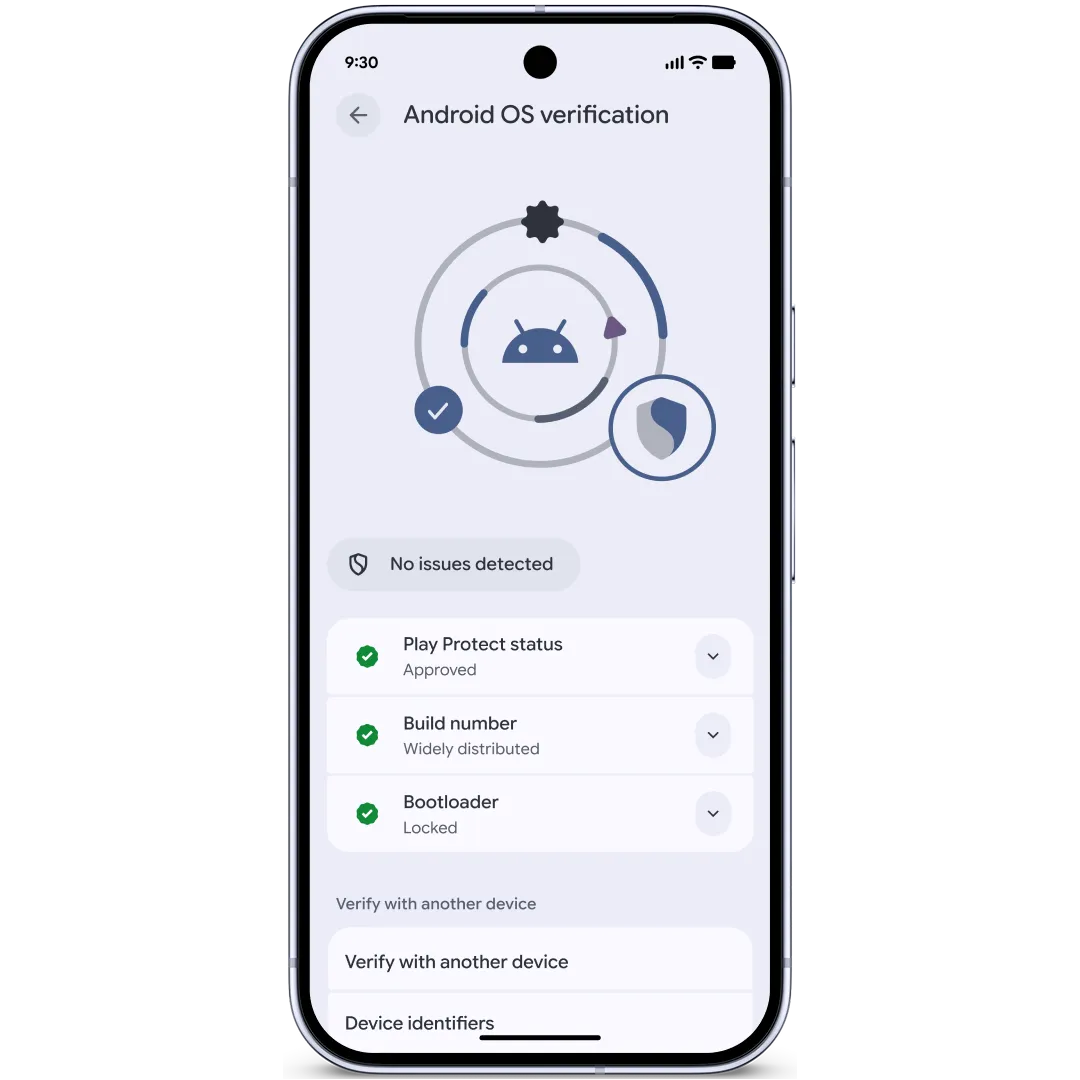
While the vast majority of approved GMS Android devices provide a secure and reliable experience, some bad actors have begun distributing unofficial, modified versions of the OS designed to look like legitimate software. These malicious versions are created to deceive you by mimicking the official OS while secretly compromising the integrity of your device. To combat this, we are introducing Android OS verification in Android 17. Launching initially on Pixel devices, this new feature helps you verify that your device is running an official, widely distributed build of the Android OS.
Android OS verification notifies a user that their device is running an official Android build
Alongside this feature, we are taking another step toward ecosystem-wide transparency by utilizing a public, append-only ledger. This provides cryptographic proof that production Google applications across Android, including foundational GMS APIs, are the authentic versions released by Google. We see this ledger as a transparent "Source of Truth" that anyone can audit at any time. If a Google-signed app isn't on this ledger, we didn't intend to release it. For Pixel users, this works with our existing Pixel System Image Transparency to prove that both the system itself and the apps running on it are official production software.
Driving security innovation across your devices and network
Scammers often try to steal one-time passwords (OTPs) from your text messages to hijack your private accounts—sometimes using malicious apps that have been granted the SMS permission. To combat this, Android now automatically hides these sensitive security codes for three hours from most apps, ensuring your OTPs stay protected from unauthorized access while they are active.
As carriers continue to rapidly transition from 2/3G to 4/5G technologies, Android 17 is introducing a new capability for the disable 2G toggle. Carriers will now have the ability to configure this setting to default to 2G being off, proactively shielding customers from legacy technology vulnerabilities in areas where 2G infrastructure is no longer maintained.
Beyond these network protocols, we are further hardening Android's long-term data protection by introducing Post-Quantum Cryptography to stay ahead of future threats. You can read more about these advanced protections and our commitment to future-proof security in our recent blog post.
Continuing to advance Android security and privacy
The updates we’ve shared today represent a significant leap forward in our journey toward a world of verifiable, transparent trust. By improving protections against banking scams, and extending powerful protections like Live Threat Detection and Android Advanced Protection, we are ensuring that Android remains the most secure platform. We will continue to innovate alongside our global partners to keep users, their data, and their devices safe throughout 2026 and beyond.