New Google for Education tools for how you teach, learn and manage
Editor’s note: This week we’re joining thousands of educators and students at ISTE, the United States’ biggest educational technology exhibition. Visit us on Level 2 in the Grand Hall, where you can check out new Chromebooks and features in Google Workspace for Education, plus sign up for our deep-dive workshops. Follow along on Twitter and Facebook for the latest updates.
At Google for Education, we're constantly working to develop new products and tools that help students learn more effectively, and help educators teach more efficiently, no matter where they are or how they teach. Part of that commitment is making sure every student and educator has access to tools that create more personal, collaborative, accessible and safe teaching and learning experiences.
Made for more personal learning
We believe technology in the classroom can help amplify teacher impact and improve student outcomes.
In Google Classroom, educators will be able to help students build literacy skills with reading activities through the new Read Along integration, which makes it easier to support differentiated learning and see insights on students’ progress. Express interest in the early access program, available in English. With practice sets, educators can soon deliver more relevant student interventions by adding their own resources and managing the resources that were suggested with the help of AI. And, when educators create an assignment with a YouTube video attached, they’ll be able to add interactive questions to help students check their understanding as they watch. Educators can create their own questions, or they can select and edit questions that are suggested with the help of AI, available in English and coming soon to the beta. Express interest in the beta, available in English, Spanish, Portuguese, Japanese and Malay.
On Chromebooks, Screencast is a powerful tool for teaching and learning, with new updates including demo tools and the ability to watch screencasts on any desktop or tablet with the web player. You can pair Screencast with cast moderator, which allows teachers and students to wirelessly share their screen to a central display using a secure access code.
Today, we’re introducing the expanded Google for Education App Hub, a place to discover all the apps that connect with Google Workspace for Education and Chromebooks, all in one place. On the Google for Education App Hub, educators and admins alike will find apps that easily integrate into assignments in Classroom using Classroom add-ons, tools to help streamline class and grade management with SIS integrations, and apps that can be easily provisioned and managed within Google Admin Console using app licensing.
With Google Classroom’s Read Along integration, educators will be able to measure progress and see metrics on accuracy, speed and comprehension for individual students and the class overall.
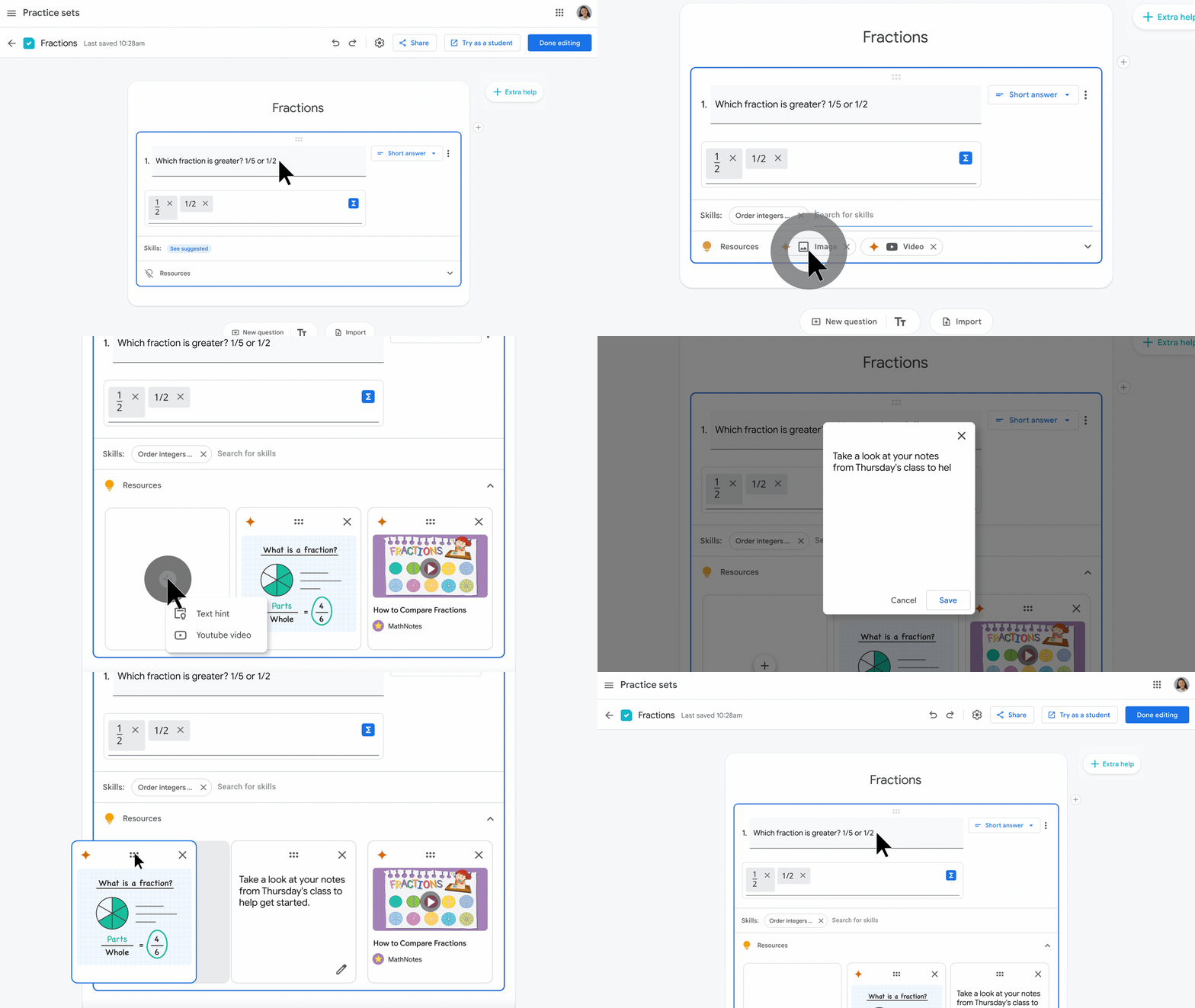
With practice sets in Classroom, educators will soon be able to review suggested hints shown to students, and add their own resources, like text hints or videos.
On the Google for Education App Hub, educators and admins can find apps that connect with Google Workspace for Education and Chromebooks.
Made for more collaborative and accessible learning
We’re also announcing new features in Google Meet. In Meet, tile pairing will allow two people to pair together so they’re both highlighted whenever one of them speaks, like pairing a presenter and their sign-language interpreter, for example. We’re also adding Q&A and polling to livestreams to make it easier to engage with larger audiences. And in Education Plus, we’re increasing the number of max attendees in Meet to 1,000 so you can connect with more of your school community at once.
In the last year, we’ve been piloting several features for Google Classroom that are intended to help education leaders support educators and students in new ways and provide more opportunities for collaboration. When Classroom analytics rolls out in the coming months, designated education leaders will be able to gain insights into student performance and engagement, including if assignments are being completed, how grades are trending, and how Classroom is being adopted – and educators will be able to see similar information for their classes, too. Available globally within Classroom, designated education leaders and support staff can now temporarily visit a class to help educators without being assigned as co-teachers.
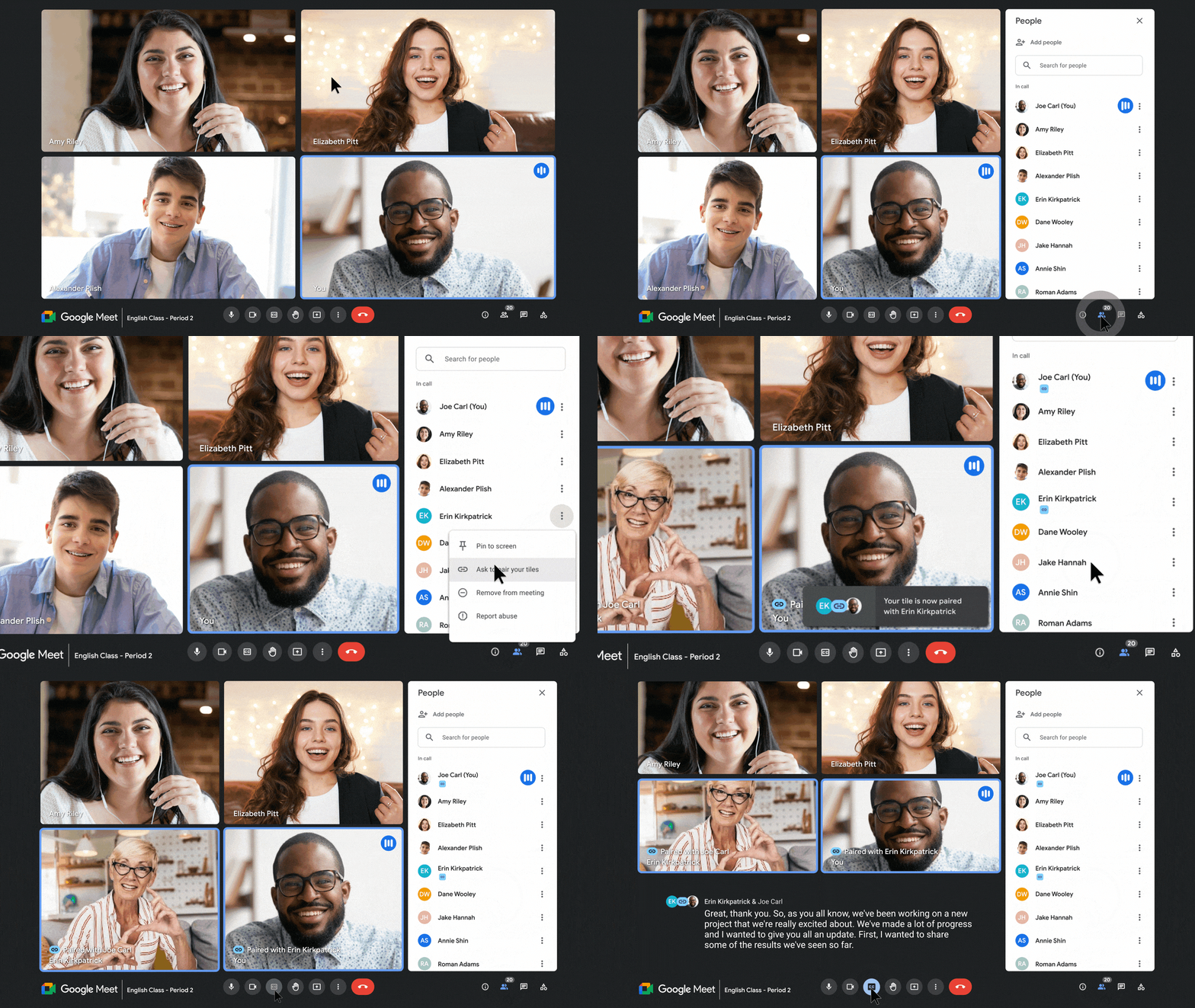
Make class more accessible by pairing a sign language interpreter to whomever is speaking
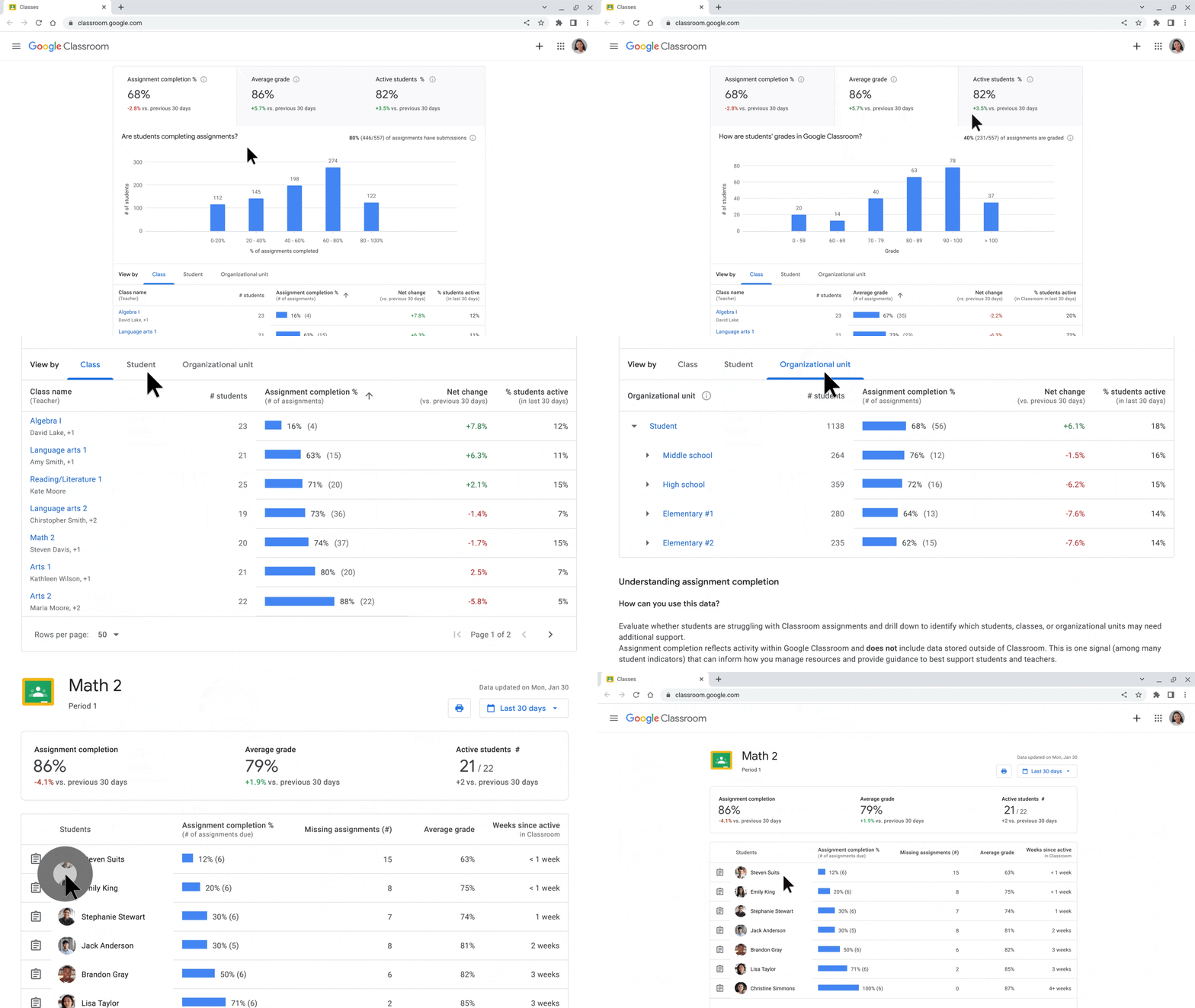
Classroom analytics will make it possible to gain visibility into student performance and engagement, including if assignments are being completed, how grades are trending, and how Classroom is being adopted. Educators will be able to view similar information for their own classes, too.
Designated education leaders and support staff can now get temporary class access to support educators, manage substitute teachers, see information for guardian conversations, and more — all without needing to be a co-teacher. To support transparent collaboration, visitors notify the educator with the reason for their visit
To simplify lesson planning, curriculum leaders and verified teachers will be able to share links to class templates and classwork to see up-to-date content, or instructional design ideas, then import the content into their classes without needing to be a co-teacher. Express interest in the beta, available in English, Spanish, Portuguese and Japanese. Educators with the Teaching and Learning Upgrade and Education Plus editions will also be able to plan, organize and analyze assignments and grades based on preferred grading periods (quarters, semesters or terms) and choose grading scales to align to their district’s grading system (whether letter, numeric or custom). Top-requested features, like the ability to disable submissions after the due date and make comments more engaging, will be available for all editions.
And with the help of AI, we’re adding accessible built-in features to Chrome browser. In March, we announced reading mode is coming to Chrome browser on ChromeOS devices. Reading mode is a tool in the sidebar to make it easier for students to read text by making it larger, changing the font and removing distractions, and is now coming to Chrome browser on all computers soon. And with PDF OCR technology, screen reader users will be able to convert images to text for PDFs in Chrome browser on ChromeOS so they can access and read them. Reading mode and image to text will be available in the coming months.
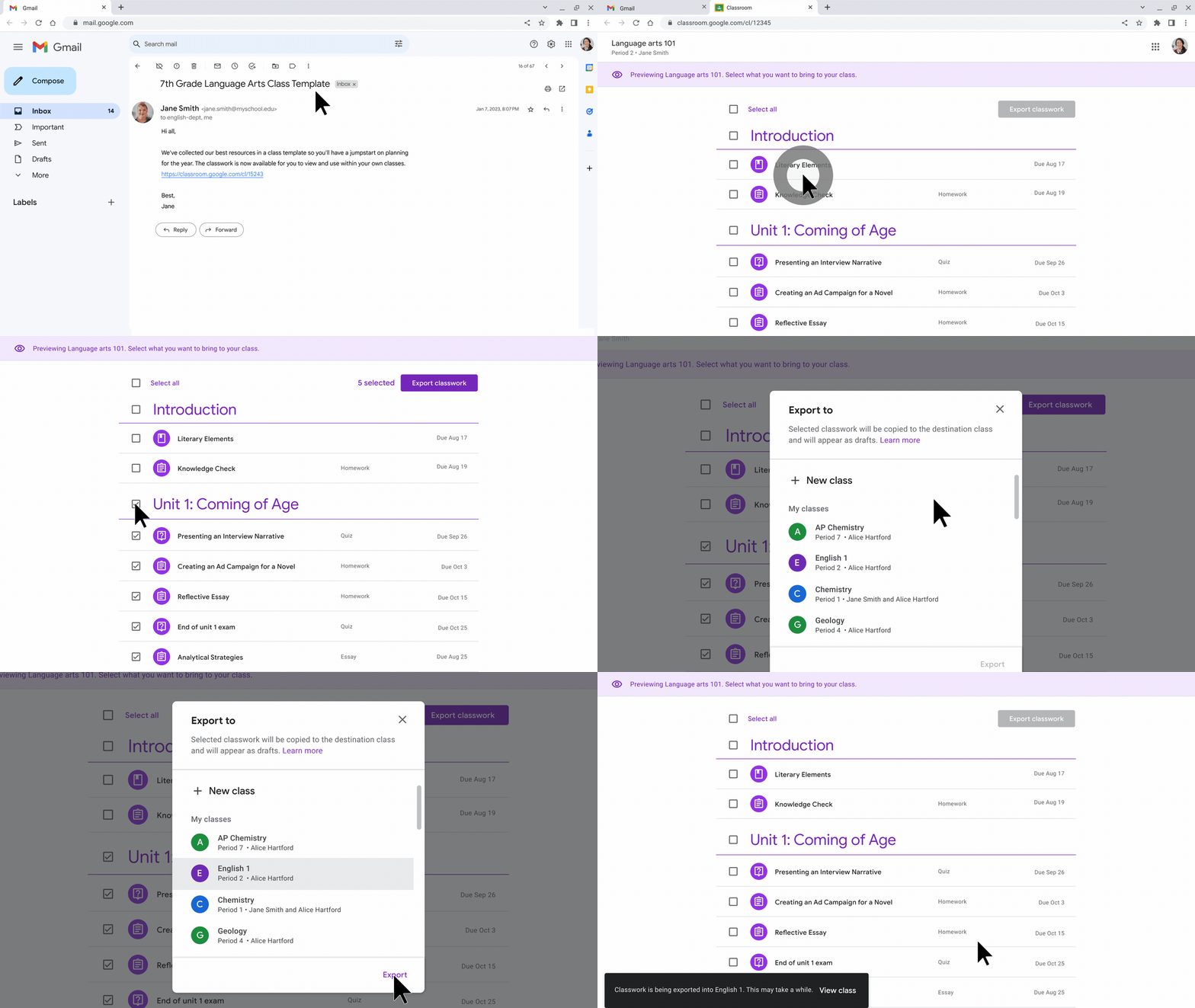
Curriculum leaders and educators can share links to class templates and classwork so educators can import classwork into their classes.
Reading mode in Chrome browser is now available on all Chromebooks
With PDF OCR technology, screen reader users will be able to convert images to text for PDFs in Chrome browser on ChromeOS
Made to support safer learning
We’re adding new tools to help students learn in a safe and secure digital environment. With new Google Workspace for Education controls, like context-aware access improvements, which help admins control who is accessing which apps in an organization, and when. And we’re further expanding spam protections in Drive by introducing a new view that makes it easier to separate and review your files, decide what you might view as spam, and stay safe from potential unwanted or abusive content.
On Chromebooks, we’re adding even more ChromeOS data controls, so admins can set up rules to prevent copy and paste (such as from AI-based tools), screen capture, screen sharing and printing. IT administrators can create an information protection strategy with rules based on data source, destination and user access. And for users, new privacy toggles in settings will give students and teachers more control over their privacy by allowing them to disable the camera and microphone when they are not in use.
We believe these features will help schools create a more secure and productive learning environment for all students.