This content is generated by Google AI. Generative AI is experimental
[[duration]] minutes

Tax season brings out scammers, so be aware of potential fraud attempts through texts, calls, and fake websites. Use Google's tools like Pixel's Call Screen, Circle to Search, Gmail alerts, and ad transparency features to protect yourself. Take a Security Checkup to enable tools like Passkeys, 2-Step Verification, and Google Password Manager for maximum security.
Summaries were generated by Google AI. Generative AI is experimental.
It’s tax season, and while you’re dreaming about your refund, scammers are, too. Cybercriminals are using the urgency of tax filing to target consumers via texts, phone calls, ads and more.
Leading into 2026, fraud industry professionals are already reporting a 67% increase in fraud attempts, with tax-related refund update scams leading the surge. That could be why Google Search saw terms like “secure tax” hit an all-time high, and “tax identity shield” rose over 120% in just the past month. Today, we’re sharing five ways Google is helping to protect you from scammers this tax season.
Remember, the IRS will never call you out of the blue to offer a discount. But to make doubly sure you don’t fall for a fake phone call, Pixel phones offer several layers of protection including Call Screen, which detects and filters out spam calls for you. 1 On average, Pixel users with Call Screen have experienced 70% fewer spam calls. 2
To help further protect you from sophisticated fraud while keeping your privacy top of mind, Pixel owners can also opt-in for real-time Scam Detection alerts in their Phone app. 1 Your Pixel will use on-device AI to alert you when it detects conversation patterns commonly associated with scams (like urgent requests for money due to an account breach). You’ll then get a notification, sound, and vibration to warn you that this request has high scam potential.
One trending tactic among scammers involves sending fraudulent text messages to your phone or through messaging apps and social media sites. During tax season, many of these scams claim to have information about a potential refund or pose as the IRS. While Android already helps protect you from suspicious texts in Google Messages with built-in Scam Detection 1 , with Circle to Search and Lens, it’s now easier to spot a potential scam message. And most importantly, you can check for scams with Circle to Search in any messaging or social media app.
On your Android device, just long-press your home button and circle the message that looks suspicious. Our systems will use AI to assess whether the message is likely a scam. You’ll see an overview with guidance and insights including suggested next steps. This capability is also available through Lens via the Google app (Android and iOS) with three short steps: take a screenshot of the message, open Lens in the Google app and tap the screenshot.
Scammers have a long and lucrative history of building fake tax service sites that look identical to the real thing, simply for the purpose of stealing your login details. Google Safe Browsing acts as your personal digital guard, checking websites in real time against a massive database of known threats.
If you’re about to wander into a trap, you’ll get an instant warning to turn back before your data becomes their property.
Google protects users by combining proactive alerts with security barriers that block 99.9% of spam and malware, and disarm dangerous attachments. When a potential scam reaches your inbox — such as a fraudulent tax notice — Gmail displays high-visibility warning banners to flag suspicious senders and links.
Always pay attention to Gmail’s red or yellow warning banners; they are your first line of defense against phishing. For maximum security, take a Security Checkup which will help boost your protections and enable tools like Passkeys, enable 2-Step Verification, setup Google Password Manager and more.
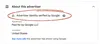
For years, we've deployed our most advanced technologies to safeguard our ads platforms from bad actors. We also know that people like to verify the source of ads. When you’re looking for help with your taxes, it's important to know who you're working with. Google’s ads transparency tools can help you verify the advertiser behind an ad you see. To learn more about an advertiser’s name, location and verification status, you can click the three-dot icon next to a Search ad and go to the “About this advertiser” section.
Tax season is stressful enough without the added weight of cyber threats. By using these tools to shore up your digital defenses today, you can focus on what really matters: getting your filing done right and keeping your refund exactly where it belongs — with you. Visit our Safety Center to learn about more ways that we’re making every day Safer with Google.