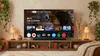
At CES 2026, we’re previewing how Gemini is making Google TV even more helpful, and bringing more ways to interact with your TV across more brands and surfaces like projectors. Here’s what we announced:
- Explore your favorite topics through a new visually rich framework that adapts Gemini’s responses to your queries with imagery, videos, and real-time sports updates. For complex topics, “Deep dives” provide narrated, interactive overviews simplified for the whole family.
- Use Gemini to search your Google Photos library for specific people or moments. Instantly apply artistic styles with Photos Remix or transform memories into cinematic immersive slideshows.
- Use Nano Banana and Veo to reimagine your personal photos or create original media directly on your TV.
- Skip complicated settings menus by using natural language to optimize your settings. Simply tell Gemini “the screen is too dim” or “the dialogue is lost” to adjust your picture and sound without leaving your movie or show.
Look for these features coming to select TCL devices first and other Google TV devices over the coming months. 1
1
The Gemini for TV experience is optimized for large screen experiences. Available for select devices, countries, and languages. Setup, Google account, and internet connection required. Android TV OS 14+. Results for illustrative purposes and may vary. Check responses for accuracy. Sequences shortened. Learn more at g.co/tv/gemini.
