Google Play Books marks 15 years of bookselling

General summary
Google Play Books is celebrating 15 years. To celebrate, you can earn 15x Play Points on any Play Books purchases this weekend. Check out 15 ways Google Play Books can help you find and read great books.
Summaries were generated by Google AI. Generative AI is experimental.Bullet points
- Google Play Books celebrates 15 years of connecting readers with authors worldwide!
- Earn 15x Play Points on any Play Books purchases this weekend only (Dec 5–7).
- Discover curated collections, find deals on ebooks/audiobooks, and preview before buying.
- Organize your library with custom shelves, personalize reading, and share with family.
- Enjoy features like Bubble Zoom for comics and Read and Listen for kid-friendly stories.
Shakespeare-ish
Fifteen years have flown, a bookish dream,
Since Google Play Books first graced the scene,
With ebooks vast, a world to explore.
Now deals abound, and points you may seize,
On Android, iOS, find what you please,
From previews free to stories galore.
Explore other styles:

It’s hard to believe, but Google Play Books is turning 15 this weekend. Since launching in 2010 as Google eBooks in the US, we’ve welcomed tens of thousands of book publishers of all sizes, connecting them with readers and helping them grow their audience worldwide. Over 15 years, our bookstore — now Google Play Books — has expanded to more than 75 countries and to over 10 million ebooks and audiobooks.
To celebrate, we’re sending a birthday present your way: earn 15x Play Points on any Play Books purchases this weekend (Dec 5–7), regardless of your current Play Points level.
In honor of 15 years, here are 15 ways that Google Play Books can help you find and read great books:
1. Access Play Books and your library across devices
Read books on our Android app, our iOS app, on the web, or in your car with Android Auto.
2. Discover curated collections and top picks from our team
Whether you’re seeking the latest bestseller or something wonderfully niche, you’ll find top-shelf titles including Our Favorite Books of 2025.
3. Find great deals on ebooks
When you visit the Books tab on Google Play or use the Play Books Android app, you’ll see a personalized deal collection of “Recent price drops'' featuring ebooks, now at a lower price. Plus, find ebooks for under $5.
4. Preview before you buy, including on YouTube
Get unlimited samples from the Google Play Books store via the Android app or iOS app or on the web. Or, head over to our YouTube channel to stream audiobook previews, at no cost.
5. Access no-charge and low-cost audiobooks
Browse hundreds of thousands of audiobooks in our store, including a selection of auto-narrated audiobooks available at no charge. And, check out our collection of audiobooks for under $6.
6. Wishlist to manage your reading list and get deals
Wishlisting books can help you keep track of your “want to read” list. And, when you use the Play Books Android app, you can opt-in to receive price drop notifications, alerting you to deals on your wishlisted titles.
7. Find future reads with the “Upcoming” section
In the “Upcoming” section in the Library tab in the Play Books Android app, you can easily see your pre-orders on a calendar that can be filtered by series or author as well as other relevant titles available for pre-order.
8. Subscribe to your favorite series
Receive the next installment in a series as soon as it’s available – you’re not charged until the book is released, you can cancel the subscription at any time, and you may receive a subscription discount. Readers in select countries can subscribe on a book series’ page if an offer is available.
9. Buy more series titles and save
When you bundle purchase two or more eligible books in a single series or by the same author, you can access special discounts. Some even offer bigger discounts for buying more titles.
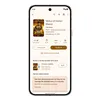
10. Earn Google Play Points
Get rewarded with Play Points when you purchase books. Play Points can be redeemed for in-app items, Google Play credit, or exclusive rewards. 1
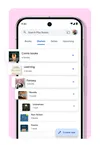
11. Organize your books with shelves
Personalize your digital library with custom shelves to categorize your books by genre, author, or any theme you’d like.
12. Read your way with note-taking tools and customization
Jot down notes that sync with your Google Drive and can be easily shared. Customize your reading experience by adjusting the font, text size, brightness and more.
13. Immerse yourself in comics
Bubble Zoom makes it easier to read comics and manga on your phone by automatically expanding speech bubbles.
14. Access kid–friendly storytime experiences
With Google Play Books' Read and Listen, ebooks are read aloud while pages flip automatically. Explore this collection of over 300 children’s books with Read and Listen, available free of charge.
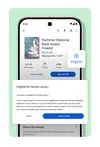
15. Share books with those closest to you
When you create a family group on Google, you can share purchased ebooks and audiobooks with up to 5 family members using Google Play Family Library, and then discuss your favorite reads.
As we celebrate 15 years of Google’s digital bookstore, we’re thankful for the authors, publishers, readers and Play Books team for their role in building this vibrant book community.