Claim your Google Cloud Credits in Google AI Studio

Nov 13, 2026

|

Google Developer Program Cloud credits are now built into Google AI Studio. Google AI Pro and Ultra subscribers can set up billing, claim monthly credits, and start building with the Gemini API without leaving their workspace.


Bala Muthukrishnan

Senior Product Manager

Seth Odoom

Product Manager


Google Cloud Credits in AI Studio
Listen to article
[[duration]] minutes
This content is generated by Google AI. Generative AI is experimental

When you’re deep in a session in Google AI Studio — testing complex prompts with frontier models like gemini-4-carbon, generating videos with Omni, or building an app — you shouldn’t have to bounce across three websites just to set up billing and claim credits when you hit a quota limit.

Starting today, you can claim and manage free API credits directly inside AI Studio. That means you can create your Developer Program profile, link billing, and track your balance, all without leaving your workspace.

If you’re a Google AI Pro or Google AI Ultra subscriber, your membership already comes with recurring monthly Google Cloud credits through the Google Developer Program.

The Google Developer Program is a no-cost membership unifying tools, learning paths, and perks across AI Studio, Google Cloud, Firebase, Android, and more. An active profile is required for Google AI Pro and Ultra subscribers to access developer benefits like monthly Google Cloud credits, higher Google Antigravity quotas, and Google Skills credits. If you don’t have a profile, the new workflow in AI Studio automatically creates one when you redeem your credits.
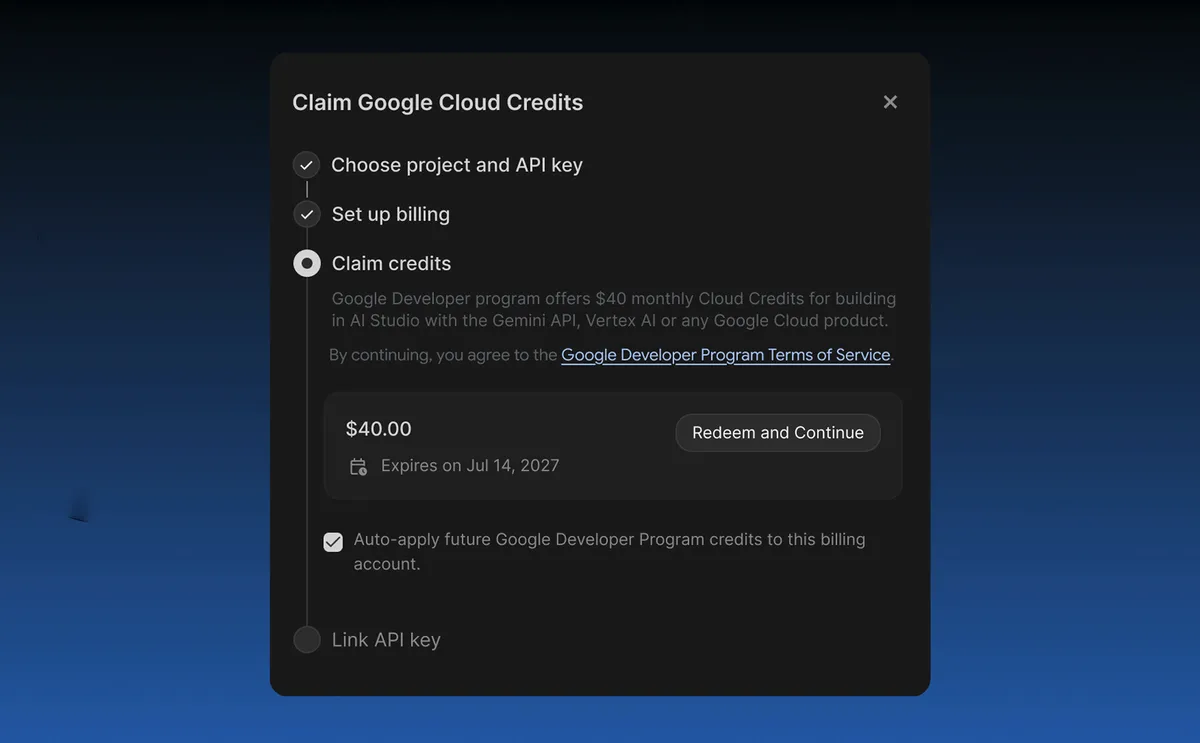
A pop-up window titled "Claim Google Cloud Credits" displaying a $40.00 credit offer expiring on July 14, 2027, with a "Redeem and Continue" button.

Check the monthly credits included in your Google AI plan

Google AI Pro and Ultra plans include recurring monthly Google Cloud credits that you can put straight toward Gemini API usage for prompting, building, and deploying AI-powered apps from Google AI Studio. As detailed in our guide to using Google AI plan credits in AI Studio, your monthly credit grant scales with your AI plan tier.
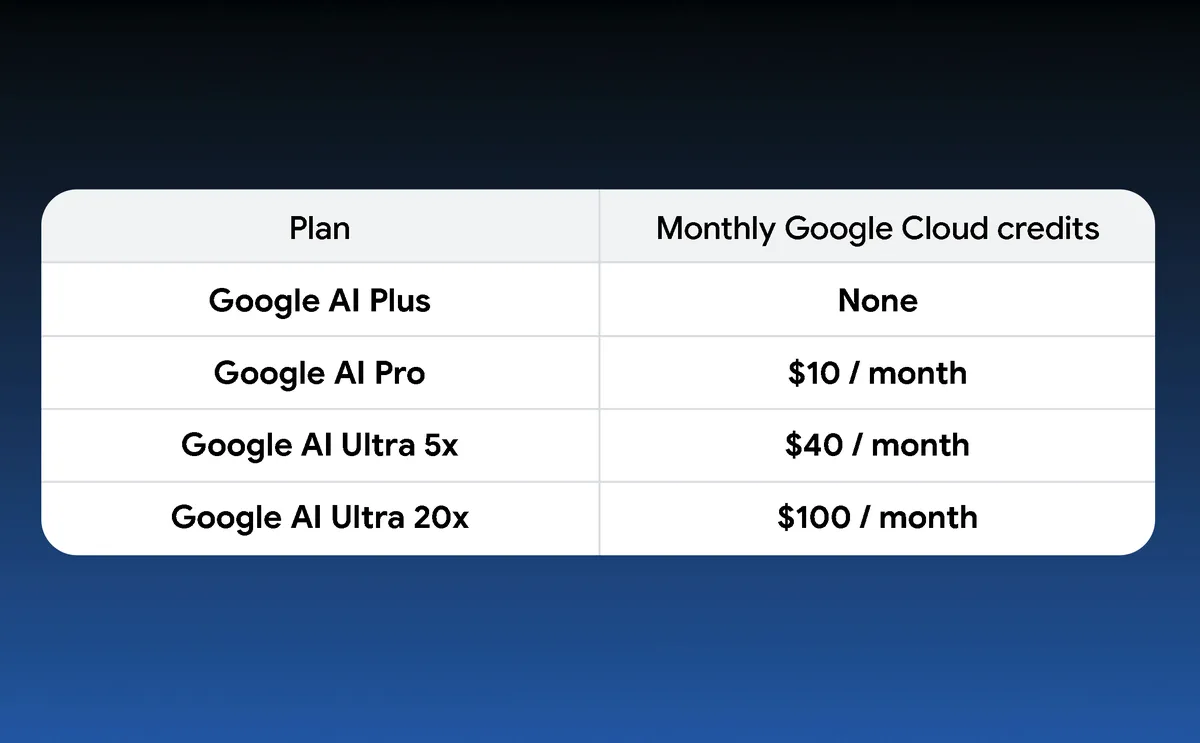
A table titled "Plan" and "Monthly Google Cloud credits" displaying four plans and prices.

Here’s how your monthly credits work over time.

  • 12-month rolling validity: Each monthly credit is valid for 12 months from issue.
  • Automatic monthly rollover: Grants stack month to month. If you’ve been a Pro or Ultra subscriber for a few months and have a Google Developer Program profile, you likely have credits waiting to be claimed.
  • Support for paid-tier models and overages: Use credits when your subscription quota runs out in AI Studio to keep creating generative media, solving complex tasks, or building 3D worlds with models like Gemini 4 Carbon. Upgrading your Google AI plan automatically increases your monthly grant.
  • Gemini API prepayment requirement: Using the Gemini API with Cloud billing requires a $5 minimum prepayment and balance in order to draw down promotional credits.
  • Primary subscriber exclusivity: Only the primary plan subscriber can use these credits. They can’t be shared among family members.

Claim and link your credits in a single click

  • Automatic credit alerts: Spot unclaimed credits and current balances right in the left nav on sign-in.
  • In-product redemption: Create your Google Developer Program profile and claim credits in one dialog.
  • Seamless billing setup and auto-apply: Set up a Cloud billing account within the same flow, spend earliest-expiring credits first, and auto-apply future monthly grants.
  • Instant paid API keys and spend tracking: Attach paid-tier API keys upon credit redemption and track your remaining balance and usage at aistudio.google.com/billing.

Get started today

Whether you’re generating with your first Gemini API key, vibe coding a full-stack application, or deploying to production with Google Cloud Run, your Google AI subscription now gives you an instant head start. Head to Google AI Studio to start building today.
Get the latest news from Google in your inbox

Sign up for our newsletters with product updates, event information, special offers, and more.

Your information will be used in accordance with Google's privacy policy. You may opt out at any time.