This content is generated by Google AI. Generative AI is experimental
[[duration]] minutes
To catch the highlights of this blog, check out the Audio Overview created with Google’s NotebookLM.
In 2025, we saw the promise of AI for education become practice: Gemini for Education is now integrated into over 1,000 US higher education institutions, reaching more than 10 million students. We’ve heard from education leaders globally that our industry-leading AI – which is private, secure, and free of charge – is helping create transformative change.
With the partnership of education institutions around the world, we launched more than 150 features and updates to support teaching and learning, and the impact has been game-changing. In Northern Ireland, educators have been saving up to 10 hours per week. A leader in Mexico shared how Google AI tools helped educators complete a task in 20 minutes that used to take the whole weekend. And leaders and students in Asia and Australia showcased the many ways that they are bringing Gemini for Education into their day-to-day.
Here are the top ways the education community is using Gemini for Education and NotebookLM:
Build a deep understanding instead of just getting quick answers with Guided Learning
Create visual explainers for presentations and group projects using Video Overviews in NotebookLM
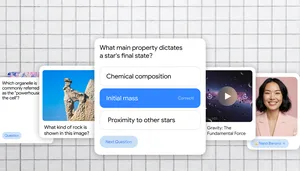
Students can prepare for exams with personalized study guides and interactive practice quizzes and flashcards in Gemini and NotebookLM
Go from idea to instruction faster with Gemini in Classroom, a suite of AI tools for teaching and learning. Here, an educator instantly drafts a quiz for their 7th-grade class.
In Google Classroom, educators can create interactive learning tools, using NotebookLM and Gems, that are grounded on class materials.
Educators are using new Chromebook and ChromeOS features to simplify management and bring instruction ideas to life:
As Google Classroom continues to innovate as an LMS solution with AI-powered teaching and learning experiences, new tools that support data-driven instruction and personal learning are becoming favorites of educators worldwide. Here’s how they are using these new features:
Class tools make managing the classroom a breeze, helping educators share content and give personalized support to every student.
Generate high-quality AI images and automatically insert them into emails, slides, documents, and more with the Quick Insert key.
Use generative AI to quickly extract information from anything on your screen and receive contextual recommendations on next steps, such as automatically adding an event to your calendar from an email banner, adding notes to a spreadsheet, and more.
Educators can soon tag assignments with learning standards and skills, then track student progress with analytics for learning goals.
Educators can create their own differentiated reading activities with help from Gemini, right from within the Read Along in Google Classroom experience.
This year, we’ve equipped institutions, educators and students with AI literacy resources. In 2025, over 1 million educators, and students received Google for Education training on AI, with over 100,000 earning Gemini Certifications – all available free of charge on Google for Education’s revamped Learning Center. And educators have been getting hands on with ready-to-use AI prompts for teachers and 100+ ways to use Gemini in education.
We’re continuing to expand our offerings to meet the needs of younger learners with new AI literacy curricula for Be Internet Awesome and AI Quests, a game-based, code-free AI learning experience created by Google Research and the Stanford Accelerator for Learning that allows middle school students to step into the shoes of researchers and experience the AI lifecycle first hand.
Dive deeper into more than 150 Google for Education announcements in our 2025 Year in Review guide. To ensure you get the latest updates and invites to our digital events, sign up on our website.
For a limited time, at least through May 31, 2026, users with an assigned Education Plus or Teaching and Learning license have access to generative AI features in Vids. AI features in Google Vids are available to users 18 years of age or older, and are in English only.