[[duration]] minutes
This content is generated by Google AI. Generative AI is experimental
The new Pixel 11 lineup is designed for Gemini Intelligence 1 and delivers impressive camera upgrades. From all-new image sensors to proactive and personalized assistance, our latest hardware is built to help you navigate your day-to-day so you can stay present for what matters most.
We’re introducing a bunch of updates that deliver timely, proactive help and help you get things done. On Pixel devices, Gemini can handle even more multistep tasks across your favorite apps, expanding to more than 40 apps and counting 1 along with plenty more features you’ll find first on Pixel.
That includes Rambler, 2 our Gemini-powered voice input feature, which is built for the way you actually talk. It delivers fast, accurate voice input that transcribes your point cleanly and concisely — even when you use filler words, like “um” and “ah.”
And beyond Rambler, we’re introducing a couple more updates right in Gboard. 3 Sign-to-text functionality, which uses Google DeepMind’s Sign Language-to-Text (SL2T) model, allows signers to naturally sign messages while enhanced writing tools help craft relevant, tailored messages in your own personal style.
And Pixel 11 will offer timely, helpful information through easily glanceable cards in the apps you’re already using. So, for example, if a friend asks about a trip that’s coming up, a card with your booking details will pop up along with details if your flight is on time or delayed. 4
You’ll also see suggestions that are contextually relevant to the conversations you’re having. Like when you’re texting about dinner while rushing out the door, Pixel can step in to help, offering a proactive prompt suggestion to lock down your reservation with just a tap. 5
You’ll see this type of proactive help in many more places across your phone — like suggestions to save events to your Calendar, locations to Maps, or relevant information to Google Wallet, like membership numbers on airline or hotel apps.
Launching in Preview, your phone will also provide location-based insights. 5 Like when you’re waiting for a table at a new restaurant, your lock screen will proactively show that location and, with just a tap, offer insights — such as top menu items or the most popular seats — from hundreds of reviews and photos, right in Google Maps.
Life’s most precious moments can happen in a flash. And we don’t want you to miss living in the moment as you try to capture it. With Magic Capture, you’ll be able to automatically snap those blink-and-you’ll-miss-it baby smiles, playful pets, or hard-to-get action shots — like a basketball frozen in mid air — with a single tap, all while you stay present and engaged.
In a typical session, Magic Capture uses both on-device intelligence and Gemini models to analyze around 400 frames to deliver perfectly-timed, high-quality 12-megapixel photos. And Magic Capture can even automatically apply edits like crop and unblur, so your moments are ready to share. Even better, you’ll also get a video without needing to go back and forth between modes.
Camera Looks allows you to choose the exact aesthetic you’re going for, right at the point of capture. Because while the Original Pixel look is widely loved, we know everyone has their own preferences.

A climbing photo, customized with the Editorial Camera Look

A close-up of a flower, finished with the Velvet Camera Look

A detail shot of baby bugs on a leaf, paired with the Editorial Camera Look

An architecture photo, rendered with the Editorial Camera Look

An image of a child, styled with the Velvet Camera Look

A picture of clouds, processed with the Editorial Camera Look
Now, you can set a new default photo look with three alternative options: Natural (for relaxed details), Shadows (for deeper contrast), and Vanilla (for a warm, golden glow). To create our Camera Looks, we made adjustments such as merging fewer frames for a minimally processed feel or rewriting color-lookup tables and more to emulate classic film chemistry.
If you want to add even more personal style to your photos, you can choose from six additional Looks: Digi, Black Tie, Minimal, Editorial, Classic, and Velvet. And every Camera Look is fully customizable so your photos will perfectly reflect your vision.
Creator Suite makes content creation even easier on Pixel.
Creator Suite’s on-screen teleprompter scrolls as you talk, so you never miss a word.
Stay organized by saving videos into project folders as you take them.
That includes handy tools right in your viewfinder — like social media gridlines or an on-screen teleprompter that dynamically scrolls as you talk — allowing you to frame recordings and speak at your own pace and never miss a word. You’ll also get more organizational support, with your captured videos saved directly into project folders. And once your video’s recorded, use Storyboard to effortlessly trim and rearrange your clips.
Plus, you can now set video as your default mode when you open Pixel Camera, so you’re always ready for action.
Pixel has always been great at capturing the stars, and Instant Night Sight makes low-light photography better than ever on Pixel 11 Pro and Pixel 11 Pro XL. You’ll now be able to capture Night Sight images up to 4.5 times faster 6 while still retaining the quality you’ve come to expect. Because when you’re shooting in low light, you shouldn't have to choose between a great shot and holding still.

Use Circle to Search in your Camera viewfinder to learn about things you see. For example, if you’re exploring a botanical garden, you can quickly point your camera at a flower, zoom in for a closer look, and use Circle to Search to instantly identify the species, find planting tips, or get more information. 7
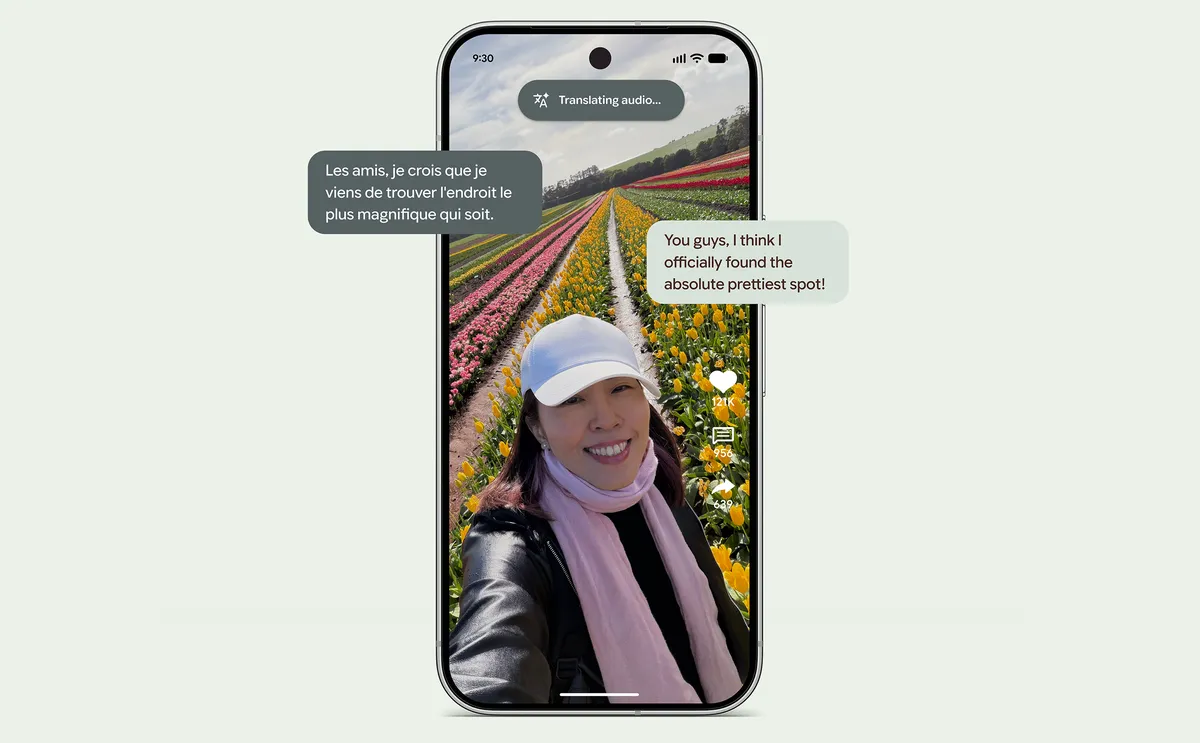
Translate videos and audio in real time with Live Translate. This technology leverages Live Translate’s real-time speech-to-speech translation capability, advanced on-device generative AI models powered by our Google Tensor G6 processor, automatically dubbing media from around the world into your preferred language. 8
Pixel 11, Pixel 11 Pro, and Pixel 11 Pro XL are available for preorder today, starting at $899, $1,099, and $1,299, respectively.
All three phones will be on shelves at the Google Store and through our retail partners on August 20. Visit the Google Store for more information on availability and product updates.
Available for select countries and languages to users 18+. Feature availability will vary. Check responses. Usage limits may apply. Some features may require subscription for higher usage.
Available on Gboard for select countries and languages. Feature availability will vary. Check responses; results may vary. Usage limits may apply. Some features may require subscription for higher usage.
Results may vary. Check responses for accuracy. Available in select countries and languages.
Available for select countries and languages to users 18+. Feature availability will vary; some features may require subscription for higher usage. Check responses. Some features available on Gemini app.
Available on Gemini app. Available for select countries and languages to users 18+. Feature availability will vary; some features may require subscription for higher usage. Check responses.
Compared to Pixel 10, Pixel 9, and Pixel 8 phone series.
Internet connection required. Check responses for accuracy. Results, availability and compatibility vary.
Results may vary. Check responses for accuracy. Available in select countries and languages. Not available for all media or apps. See g.co/pixel/livetranslate for more information. Translation may not be instantaneous.