This content is generated by Google AI. Generative AI is experimental
[[duration]] minutes
The latest Android update brings helpful new features that add a spark of joy to your everyday routine. From sharing your live location mid-chat to discovering your next favorite app through bite-sized shorts, the latest Android features are designed to help you express yourself and stay in sync with what matters most. Here’s what’s new.
You can now share locations directly in Google Messages, thanks to Find Hub, so you can see each other on a real-time map view. Whether you’re meeting up at a concert or getting picked up at the airport, share your location for as long as you need, with the flexibility to stop sharing at any time – entirely within your conversation.
Share real-time locations directly in Google Messages.
Get missing bags back with help from Find Hub. If you’ve added a tracker tag to your luggage, share its location link with your participating airline so they can help find it and provide updates. It’s up to you when to share and when to stop sharing your luggage’s location. Travel with confidence knowing there’s another way to help your lost bags find their way back to you.
Share your tracker tag’s location to help staff find your luggage.
Discovering apps is easier with Google Play shorts. Soon, you’ll be able to explore new content as you scroll through a feed of short-form videos, from wellness apps to photography, shopping and webtoons. It’s a simpler way to see how an app works and if it’s what you’re looking for, all without leaving Google Play.
See apps in action before you tap download.
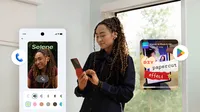
Make conversations feel more personal by designing a custom Calling Card. Your friends will see your chosen photo, font and color, so your caller ID is as unique as you. Share it with everyone, or just your saved contacts, and edit or remove your Calling Card at any time.
Design your own Calling Card for outgoing calls.
Keep the family entertained while you’re parked with new Teacher Approved games and apps on Android Auto. The kid-friendly lineup, catered for ages 3 - 12, offers a fun and educational play experience right on your dashboard. Children can learn and play with like Disney Coloring World, LetraKid: Writing ABC for Kids, Marvel HQ: Kids Super Hero Fun, Draw a Stickman: EPIC 3, Kids Games: For Toddlers 3-5 and more.
Explore a world of fun and educational games.
Remix the latest Emoji Kitchen combinations and add some fun to your chats. From the ultimate cheesy gesture 🧀 + 🌹 to funky skunks 🎷 + 🦨, find a scent-sational new way to express yourself and share it with friends in Gboard.
Express yourself better with new combinations in Emoji Kitchen.
Learn more about these new features at android.com/updates and watch them in action here. If you have a Pixel device, check out the new Pixel features ready to use today.