[[duration]] minutes
This content is generated by Google AI. Generative AI is experimental
Since we launched Circle to Search, you have circled, scribbled and highlighted your way through billions of queries per month. It’s been a game changer for questions like “What are those shoes?” or “Where is this hiking trail?” — and it’s already a powerful tool for finding more information about anything on your Android’s screen.
But we know that sometimes you aren't just looking for a single thing on your screen — you're looking for the whole thing. Like when you're redesigning a room, you don't want a single lamp, you’re trying to build an entire mid-century modern vibe in your living room. Today’s update levels up Circle to Search so you can now explore multiple objects in an image, all at once. Whether you’re curating a mood board, building an entire outfit or just satisfying your multi-layered curiosity, here’s how Circle to Search is getting a whole lot more helpful.
Let’s say you're scrolling on your phone, and you see a breathtaking photo of a variety of vibrant, colorful fish. You want to explore more. Instead of wondering what's what, just circle all the fish on your screen and ask "what are all these fish, and how do they coexist?" Circle to Search will identify each unique species you've selected, from the Honeycomb Filefish to the Moon Jellyfish. Beyond just naming them and surfacing related images, it will explain the science behind their underwater community, and give you links out to the web to dive deeper.
With this update, you'll see more visual results from a single search, which creates new opportunities for merchants and businesses to be discovered.
Another popular way people use Circle to Search is for fashion; shopping-related searches are among the top uses of Circle to Search. Say you see an outfit you love on social media and you want to replicate the vibe. Now, you can search for every piece — accessories, clothing and shoes — all at once.
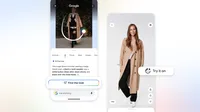
On your Samsung Galaxy S26 series or Pixel 10, just tap, scribble or circle an entire outfit to deconstruct the look. Circle to Search instantly identifies every component, finding similar items to jumpstart your shopping or style inspiration.
It’s also now easier to virtually try on items when inspiration strikes. In the countries where shoppers can already try on clothes from product listings across Google, now they can enter their virtual dressing room right from Circle to Search on the Samsung Galaxy S26 series or Pixel 10 devices. See an outfit on your social feed that you want to replicate? Just circle it, find the look, and select "Try On" to see it on you.
This next-generation Circle to Search experience is made possible by Gemini 3's agentic planning, reasoning and tool capabilities, which also enhances our visual query fan-out technique. Instead of simply looking for a single match, the model now thinks through a multi-step plan to get you the best results for everything you search on your screen. It automatically identifies the most important parts of an image to crop, runs several searches at once, and cross-references what it finds to compile a final response — including images from across the web — for each item you’ve searched.
Check out the latest improvements to Circle to Search, starting today on the new Samsung Galaxy S26 series and the latest Pixel 10 devices, and coming to more Android devices soon.