[[duration]] minutes
This content is generated by Google AI. Generative AI is experimental

Since releasing Gemma 4 two months ago, we've been continuously working to expand its capabilities. First, we introduced Multi-Token Prediction (MTP) to accelerate inference, and just a couple of days ago, we released a 12B model to bridge the gap between our E4B and 26B MOE models.
Today, we are releasing new checkpoints optimized with Quantization-Aware Training (QAT) to make Gemma 4 even more efficient, so you can run models locally on everyday edge devices and consumer GPUs.
By simulating quantization during training, QAT minimizes quality loss when the model is compressed. This release includes QAT checkpoints for the popular Q4_0 quantization format as well as a novel quantization format specialized for mobile use cases. Using this mobile format, we’ve reduced the memory footprint of Gemma 4 E2B to 1GB. Together, these dramatically reduce memory requirements while preserving the capabilities and quality you expect from Gemma 4.
Quantization is a key technology to run models on consumer hardware by reducing their memory footprint while also accelerating decode speed. However, standard Post-Training Quantization (PTQ) often leads to performance degradation. Instead of simply quantizing the model after training, QAT integrates the quantization process directly into training. While PTQ is already effective at preserving quality, our QAT results yield even higher overall quality compared to standard PTQ baselines.
We applied this QAT recipe to the popular Q4_0 format to maximize performance for all the models. For the edge models (E2B and E4B), we rethought how we approach quantization with a special mobile-specialized quantization schema.
Below are the approximate memory requirements indicating how much VRAM is required to load the models:
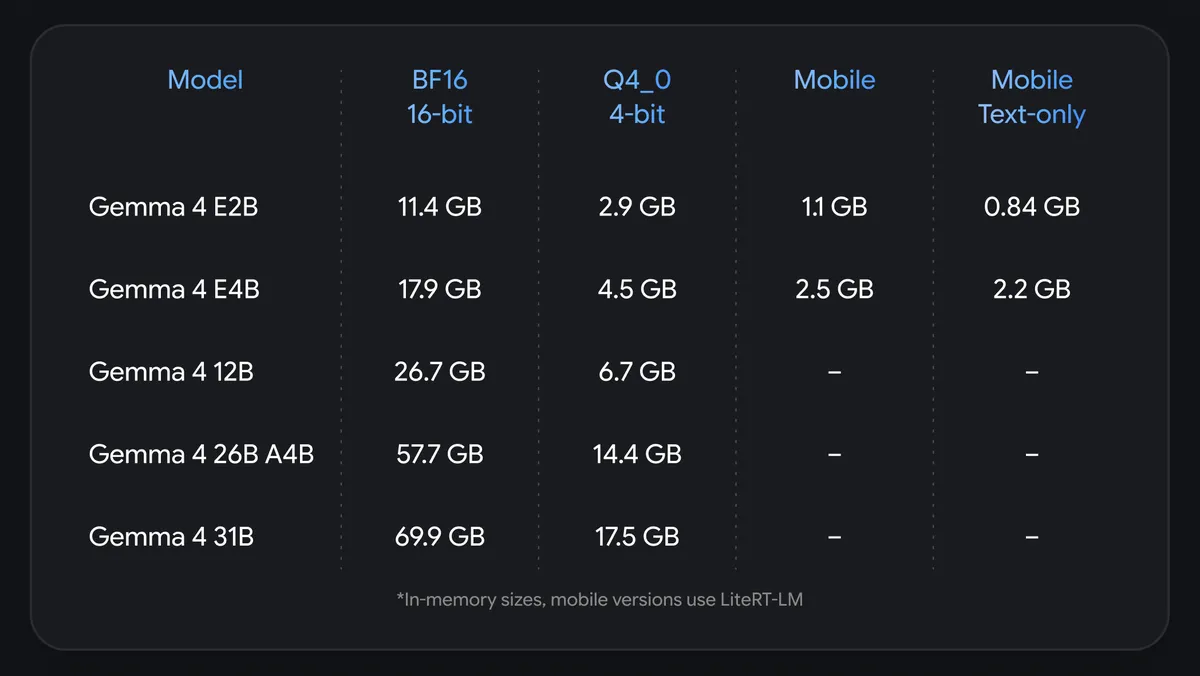
Standard compression formats are often hard for mobile processors to run efficiently. To ensure Gemma 4 performs smoothly on mobile, we engineered a custom mobile-quantization schema designed for edge hardware:
Because our audio and vision encoders are not needed in many use cases, you can optimize your memory footprint even further by deploying only the modalities you need. For example, the Gemma 4 E2B text-only model (without Per-Layer Embeddings) requires less than 1 GB of memory.
To make those models easily usable with your preferred workflow, we’ve partnered with popular developer tools across the ecosystem to seamlessly support the Gemma 4 QAT checkpoints starting today:
We can't wait to see what you build with Gemma 4 running locally!