How we tested Guided Frame and Real Tone on Pixel

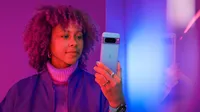
In October, Google unveiled the Pixel 8 and Pixel 8 pro. Both phones are engineered with AI at the center and feature upgraded cameras to help you take even more stunning photos and videos. They also include two of Google’s most advanced and inclusive accessibility features yet: Guided Frame and Real Tone. First introduced on the Pixel 7, Guided Frame uses a combination of audio cues, high-contrast animations and haptic (tactile) feedback to help people who are blind and low-vision take selfies and group photos. And with Real Tone, which first appeared on the Pixel 6, we continue to improve our camera tuning models and algorithms to more accurately highlight diverse skin tones.
The testing process for both of these features relied on the communities they’re trying to serve. Here’s the inside scoop on how we tested Guided Frame and Real Tone.
How we tested Guided Frame
The concept for Guided Frame emerged after the Camera team invited Pixel’s Accessibility group to attend an annual hackathon in 2021. Googler Lingeng Wang, a technical program manager focused on product inclusion and accessibility, worked with his colleagues Bingyang Xia and Paul Kim to come up with a novel way to make selfies easier for people who are blind or low-vision. “We were focused on the wrong solution: telling blind and low vision users where the front camera placement is,” Lingeng says. “After we ran a preliminary study with three blind Googlers, we realized we need to provide real-time feedback while these users are actively taking selfies.”
To bring Guided Frame beyond a hackathon, various teams across Google began working together, including the accessibility, engineering, haptics teams and more. First, the teams tried a very simple method of testing: closing their eyes and trying to take selfies. Even that inadequate test made it very obvious to sighted team members that “we’re under-serving these users,” said Kevin Fu, product manager for Guided Frame.
It was extremely important to everyone working on this feature that the testing centered on blind and low-vision users throughout the entire process. In addition to internal testers, which are called “dogfooders” at Google, the team involved Google’s Central Accessibility team and sought advice from a group of blind and low-vision Googlers.
After coming up with a first version, they asked blind and low-vision users to try the not-yet-released feature. “We started by giving volunteers access to our initial prototype,” says user experience designer Jabi Lue. “They were asked about things like the audio, the haptics — we wanted to know how everything was weaving together because using a camera is a real-time experience.”
Victor Tsaran, a Material Design accessibility lead, was one of the blind and low-vision Googlers who tested Guided Frame. Victor remembers being impressed by the prototype even then, but also noticed that it got better over time as the team heard and addressed his feedback. “I was also happy that Google Camera was getting a cool accessibility feature of this quality,” he says.
The team was soon experimenting with multiple ideas based on the feedback. “Blind and low-vision testers helped us identify and develop the ideal combination of alternative sensory feedback of audio cues, haptics and vibrations, intuitive sound and visual high-contrast elements,” says Lingeng. From there they scaled up, sharing the final prototype broadly with even more volunteer Googlers.

Kevin, Jabi and Lingeng (with his son) all taking selfies to test the Guided Frame feature. Victor using Guided Frame to take a selfie.

Kevin, Jabi and Lingeng (with his son) all taking selfies to test the Guided Frame feature. Victor using Guided Frame to take a selfie.

Kevin, Jabi and Lingeng (with his son) all taking selfies to test the Guided Frame feature. Victor using Guided Frame to take a selfie.

Kevin, Jabi and Lingeng (with his son) all taking selfies to test the Guided Frame feature. Victor using Guided Frame to take a selfie.
This testing taught the team how important it is for the camera to automatically take a photo when the person’s face is centered. Sighted users don’t usually like this, but blind and low-vision users appreciated not having to also find the shutter key. Voice instructions also turned out to be key, especially for selfie buffs aiming for the best composition: “People quickly knew if they were to the left, right or middle, and could adjust as they wanted to,” Kevin says. Allowing people to take the product home and test in everyday life allowed Guided Frame to help with both selfies and group pictures, which was something Kevin says they discovered users wanted, too.
The team wants to expand what Guided Frame can do, and it’s something they’re continuing to explore. “We’re not done working toward this journey of building the world's most inclusive, accessible camera,” Lingeng says. “It’s truly the input from the blind and low-vision community that made this feature possible.”
How we tested Real Tone
To make Real Tone better we worked with more people in more places, including internationally. The goal was to see how the Real Tone upgrade the team had been working on performed across more of the world, which required expanding who was testing these tools.
“We worked with image-makers who represented the U.K., Australia, India and Laos,” says Florian Koenigsberger, Real Tone lead product manager. “We really tried to have a more globally diverse perspective.” And Google didn’t just send a checklist or a survey — someone from the Real Tone team was there, working with the experts and collecting data. “We needed to make sure we represented ourselves to these communities in a real, human way,” Florian says. “It wasn’t just like, ‘Hey, show up, sign this paper, boom-boom-boom.’ We really made an effort to tell people about the history of this project and why we’re doing it. We wanted everyone to be respected in this process.”
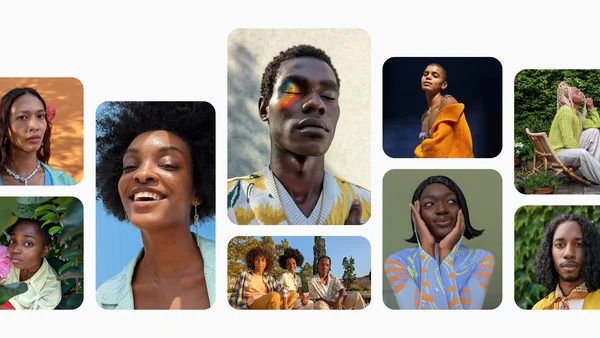
Once on the ground, the Real Tone team asked these aesthetic experts to try to “break” the camera — in other words, to take pictures in places where the camera historically didn’t work for people with dark skin tones. “We wanted to understand the nuance of what was and wasn’t working, and take that back to our engineering team in an actionable way,” Florian explains.
Team members also asked — and were allowed — to watch the experts edit photos, which, for photographers, was a very big request: “That’s very intimate for them,” Florian says. “But then we could see if they were an exposure slider person, or a color slider person. Are you manipulating tones individually? It was really interesting information we took back.”
To get the best feedback, the team shared prototype Pixel devices very early — so early that the phones often crashed. “The Real Tone team member who was there had access to special tools and techniques required to keep the product running,” says Isaac Reynolds, the lead Product Manager for Pixel Camera.
Photos taken with Pixel 7 Pro. The image on the left was taken without Night Sight. The image on right was taken with Night Sight for Real Tone enhancements.
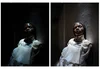
After collecting this information, the team tried to identify what Florian calls “headline issues” — things like hair texture that didn’t look quite right, or when color from the surrounding atmosphere seeped into skin. Then with input from the experts, they settled on what to work on for 2022. And then came the engineering — and more testing. “Every time you make a change in one part of our camera, you have to make sure it doesn’t cause an unexpected negative ripple effect in another part,” Florian says.
In the end, thanks to these partnerships with image experts internationally, Real Tone now works better in many ways, especially in Night Sight, Portrait Mode and other low-light scenes.
“I feel like we’re starting to see the first meaningful pieces of progress of what we originally set out to do here,” Florian says. “We want people to know their community had a major seat at the table to make this phone work for them.”
A version of this post was originally published in December 2022.