[[duration]] minutes
This content is generated by Google AI. Generative AI is experimental

Between flash sales, doorbusters, and dozens of open browser tabs, holiday deal-hunting can take up all your time. Our shopping features are here to lend a hand, helping you save time and money. Here are four ways to snag the best deals and gifts this Black Friday and Cyber Monday.
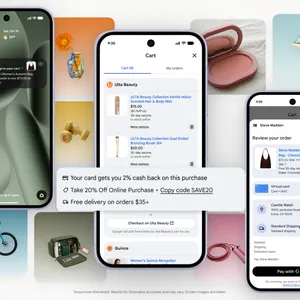
Universal Cart can act as your central game plan for Black Friday and Cyber Monday. Add items you’re eyeing across retailers into one organized place, Universal Cart will notify you about price drops or when out-of-stock items return. It also shows you merchant promo codes and offers.
The cart is built on Google Wallet so it understands your card perks and intelligently helps you choose between payment methods. When you’re ready to buy, check out securely right in the cart using Google Pay, or transfer your items to the retailer’s site to check out there.
Shopping for friends and family who have niche hobbies or never share a wishlist can leave you stuck for ideas. With AI Mode in Search or the Gemini app, just describe the person you’re shopping for in everyday language like “useful gifts under $40 for an uncle training for his first half marathon” to get tailored thought starters and gift ideas with customer reviews, photos, and store availability.
Before you click “check out,” make sure you have the best deals out there. Tap the product listing on Google to compare prices across merchants and review price history to see whether the price is low, typical, or high. If you want to know when the price drops, tap “Track price” or ask AI Mode to let you know when there’s a deal.
If an item on a store shelf catches your eye, you do not have to guess what to type into Search to find it online. Just open up the Google app (Android and iOS), tap the Lens camera icon and snap a photo to instantly learn more about the product and see everything from customer reviews to product details to similar styles. You can even ask follow-up questions about what you see, like “does this come in navy blue?” or “what’s a great complimentary gift to go with this?”
With Google tools helping you tackle your holiday gift shopping, you can check your list off early and spend more time celebrating with family and friends.




College students are eager to turn their dull dorm rooms into cozy spaces. Here are the Google Search trends we’re seeing.