[[duration]] minutes
This content is generated by Google AI. Generative AI is experimental
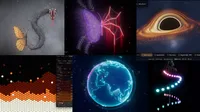
Gemini 4 Neon brings frontier-level intelligence with fast end-to-end task completion across complex software engineering, knowledge work, and science workflows. Since we introduced the model, builders have been experimenting with its balance of depth and efficiency, dialing up its thinking levels for complex coding and interactive 3D builds. Check out five projects showing what Neon can do below.
Starting with a literal neon world: @HarshithLucky3 used Neon on high thinking in Google Antigravity to build this glowing 3D Earth.
@thtbee_ ran Neon on xhigh thinking in Google Antigravity to craft imaginative Three.js butterflies.
In under five minutes, @anicho used /swarm with Neon in Google Antigravity to build this glowing, interactive hexagon flame shader for the web.
@kimmonismus used Neon in Google Antigravity to build an interactive 3D black hole shader with switchable camera viewpoints and lensing warp sliders.
@goodhunt coded a 3D pendulum wave simulation with Neon where each sphere's period creates traveling interference patterns.
Developers can get started with Gemini 4 Neon using the Gemini API paid tier in Google AI Studio and Android Studio. If you’re a paid Google AI Pro or Ultra subscriber, you can try Neon in Google Antigravity, and all Pro and Ultra subscribers can try it in AI Studio or by selecting Gemini 4 Neon from the model drop-down in the Gemini app. Enterprise teams can use Neon in Gemini for business (via the API or model drop-down) and Google Antigravity.