[[duration]] minutes
This content is generated by Google AI. Generative AI is experimental

Whether your spooky spirit awakens on October 1 or you’re scrambling for a low-effort costume an hour before a party, Halloween prep shouldn’t feel like a curse.
No matter how you celebrate, hunting down the perfect costume and brewing up ideas for an epic party don’t have to drain your time — or your wallet. Here are six ways that Search can work its magic and do the heavy lifting this season.
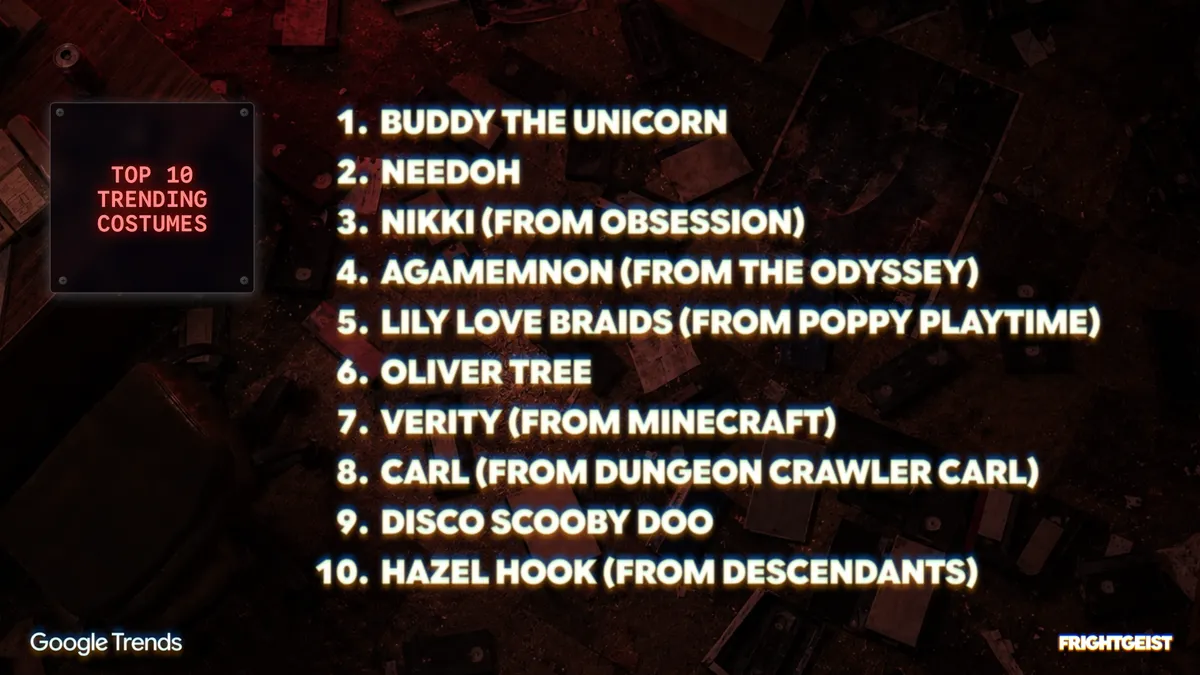
Check out Google’s annual Frightgeist site for outfit inspiration. You can explore the top trending costumes nationwide and even see what’s trending in your neighborhood.
Whether you’ve waited until the last minute or just don’t want to spend money on a costume this year, Lens in Search can tell you how to use things from your closet to create the perfect Halloween ensemble. Simply lay out a few items from your wardrobe, take a picture, and ask something like, “Help me come up with ideas to DIY a Halloween costume using these statement pieces from my closet.”
Before you break out the face paint, visualize the look with image generation in Search. Open the Google app for Android or iOS, tap the Lens camera icon in the search bar, and then select “Create” at the bottom of your screen. Then take a selfie and add something like, “I want to do unicorn makeup for Halloween. Show me what I could do that will stand out at a party without being too hard to replicate.” This way, you can generate a preview of the look and, if you like it, you can follow up to figure out what products you need to pull it off.
If you’re looking for ways to do Halloween on a budget, ask AI Mode in Search for help finding free activities and events in your neighborhood. It can help identify nearby costume swaps, community and neighborhood festivals, creative workshops and more!
Want to set the mood for your Halloween party but don’t want to spend hours creating a playlist? Connect your YouTube Music account with Search, and ask AI Mode to “Make a spooky background playlist for a Halloween party that moves from eerie ambient synth at dinner to upbeat retro horror-funk for when the party gets going.”
If you prefer to celebrate Halloween with a movie marathon but don’t know what to watch, use AI Mode to come up with a hyper-specific list of movies. Try asking something like, “Help me make a 90s nostalgia Halloween movie watchlist. I like witchy aesthetics, small-town autumn settings, and practical effects but without heavy gore" to quickly narrow down your options to a list that matches your vibe.