[[duration]] minutes
This content is generated by Google AI. Generative AI is experimental

More than 4 billion users rely on Google Workspace apps like Gmail, Docs and Drive to create, collaborate and get things done. Today, we’re announcing new ways that AI can help you do even more:
Keep reading to learn more about these new products and features for Google AI subscribers and Google Workspace business customers — and how you can try them.
New conversational features are evolving so you can get things done at the speed of your voice. Today we're announcing new voice capabilities in Gmail, Docs and Keep to help you brainstorm, organize your thoughts and take action.
Gmail Live is a voice-activated way to search your inbox and get synthesized information, quickly.
Just talk to Keep and it will turn what you say into organized notes and lists.
These new conversational features in Gmail, Docs and Keep are rolling out to Google AI Pro and Ultra subscribers and in preview to Google Workspace business customers this summer.
Creating with AI should feel like creative direction, not a roll of the dice. Too often, you generate a great image only to find it’s almost what you wanted — but making one small change means starting over completely.
Google Pics is our new image creation and editing tool, built on our latest Nano Banana model, with the precise creative controls you need to build exactly what you imagine. Whether you’re building a design from a blank canvas or editing an existing photo, Pics takes the hassle out of complex image generation. From designing event flyers and social media content to tweaking digital illustrations, this new tool includes features like:
Google Pics is a new image creation and editing tool, built on our latest Nano Banana model, that helps you create just about anything with precise creative control.
Personalize designs by moving objects and updating text directly inside the image with Google Pics.
Keep your creative flow going with helpful Google Workspace integrations like editing images right in Slides.

Create anything in Pics with new degrees of creative control – from flyers and birthday cards to social media ads and invitations.
Google Pics is launching today to a limited group of Trusted Testers. This summer, it will roll out globally to Google AI Pro and Ultra subscribers and in preview for Google Workspace business customers.
Earlier this year, we announced AI Inbox in Gmail to help you better manage and stay on top of your inbox by intelligently and securely prioritizing your most important updates and time-sensitive tasks.
Today, we're rolling out new capabilities that let you take action and get things done seamlessly:
AI Inbox helps streamline task management with personalized replies, instant file access and more.
AI Inbox is currently available for Google AI Ultra subscribers and in preview to Google Workspace Enterprise Plus customers. Today we’re starting to roll out to all Google AI Plus and Pro subscribers in the U.S., along with these new feature updates.
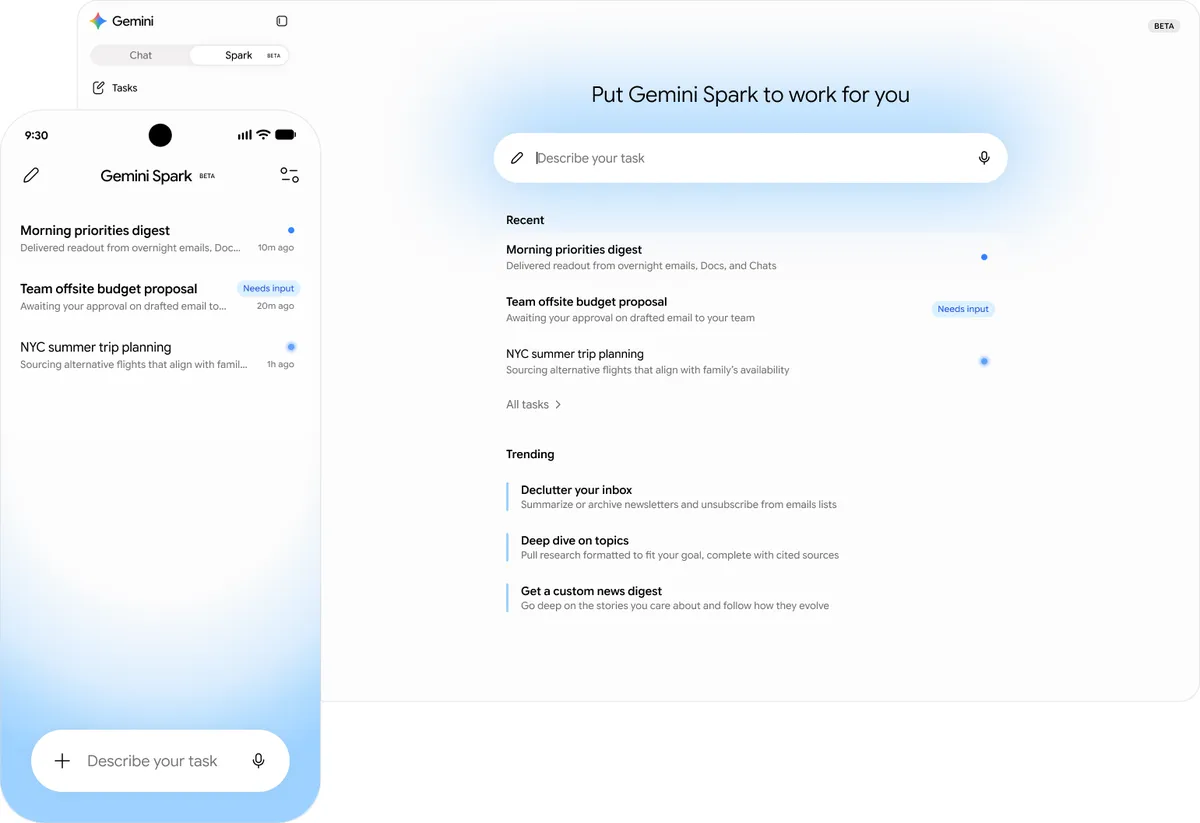
Announced today at Google I/O, Gemini Spark is a 24/7 personal AI agent that helps you navigate your digital life. Spark represents a big shift for Gemini, transforming it from an assistant that can answer questions, to one that takes action on your behalf, under your direction. You choose whether to turn it on and it’s designed to ask you first before performing high-stakes actions like sending emails and adding events to your calendar. Gemini Spark in Google Workspace will be available soon in preview for business customers in the Gemini app.
Gemini Spark in the Gemini app helps you navigate digital life and integrates with your Workspace apps.
From brainstorming out loud with conversational voice features, to bringing ideas to life visually exactly as you imagine in Google Pics, to streamlining email management with AI Inbox, to helping you navigate digital life with Gemini Spark — these latest updates help you save time so you can focus on the work that matters most.